

What an Open-Source AI Gateway Is
An open-source AI gateway is gateway software whose source code you can download, run, and modify yourself. Open-source projects such as LiteLLM and Portkey publish the full gateway: the proxy server, key management, routing, and usage tracking that the architecture guides describe [1][2][3]. Choosing an open source ai gateway means taking that code and running it as your own service. “Open source” refers to the license and the code, not the operating cost; you still pay for the infrastructure and the people who run it.
The license matters more than most teams assume. LiteLLM is available under the MIT license for its core, with an enterprise directory under a separate license [1]. Portkey’s gateway is MIT-licensed [3], and Kong Gateway is Apache-2.0 [7]. Before adopting any project, read the license terms yourself, because the parts you can use freely and the parts that require a commercial agreement differ per project.
The Main Open-Source Options
Three projects cover the range of open-source AI gateway approaches. LiteLLM is an open-source gateway from BerriAI that exposes an OpenAI-format API across a large catalog of LLM providers, with a proxy server that adds virtual keys, spend tracking, budgets, guardrails, and an admin dashboard [1][2]. It is the most widely adopted of the three and is actively maintained [1].
Portkey’s gateway is open source and pairs a universal API with routing, automatic fallbacks, observability, and guardrails [3][4]. It can be self-hosted, while the same company also sells a managed control plane with free, Pro, and enterprise tiers [4]. Kong takes a different route: its open-source gateway is an API gateway, and AI proxy and transformer plugins add model traffic handling on top, with advanced AI plugins reserved for the enterprise offering [6][7].
These are not the only options, but they illustrate the three shapes: a dedicated model gateway, a gateway with a managed sibling, and an API platform with AI plugins. If you are still deciding whether you need any gateway, the best AI gateways comparison covers the full market including managed products.
Deployment Models for Self-Hosting
Open-source gateways support a range of deployment models. LiteLLM documents running the proxy in a container, on Kubernetes with Helm, or on cloud infrastructure provisioned with Terraform for AWS and GCP [2]. Portkey’s gateway is designed to be self-hosted as a service, and Kong Gateway has a long history of self-hosted API gateway deployment [3][6].
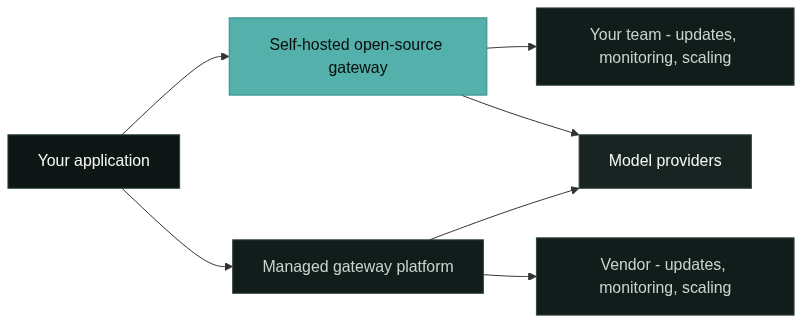
The deployment model determines the operations burden. A single container behind TLS is enough for a prototype; a production deployment adds a metadata database, log storage, load balancer, and health checks. Choose the model that matches your team’s existing infrastructure, because the gateway should fit how you already deploy services, not the other way around. The diagram below shows where the operational work lands in each path.
Self-Hosting Requirements
Self-hosting needs more than a server. A production open source ai gateway requires compute for the proxy itself, a metadata database for keys and spend tracking, storage for logs, and the networking pieces: TLS termination, DNS, and a way to reach the model providers [2]. LiteLLM’s documentation describes the proxy server plus the supporting services that make key management and budget tracking work [2].
The requirements are not large by modern standards, but they are real and they must be maintained. Disk fills, certificate expiry, and database backups become your incidents. Budget for the components, not just the container image, when you estimate the effort.
Infrastructure Responsibility
With a self-hosted gateway, your team owns the full stack underneath it. That includes patching the operating system and runtime, upgrading the gateway version, backing up the database, renewing certificates, and handling capacity when traffic grows. None of this appears in the license cost, but all of it appears in the operating budget.
The responsibility shows up most clearly in incidents. When the gateway is slow at 3 a.m., the question is who can look at the metrics and fix it. On a self-hosted path the answer is your team; on a managed path it is the vendor. This single difference drives most of the decisions in the matrix later in this article.
Updates and Provider API Changes
Self-hosting means you own the update cadence. Upstream projects release regularly, and provider APIs change: models are renamed, endpoints move, and pricing updates need configuration changes. With an open-source gateway, you test and apply those updates yourself, which means tracking releases and reading changelogs [1][6].
The maintenance status of the project matters here. LiteLLM, Portkey, and Kong are all actively maintained repositories, which reduces the risk of abandoned code [1][3][7]. But active upstream development cuts both ways: you benefit from fixes and features, and you also inherit the pace of change, so your team needs a routine for upgrades, not just an initial install.
Monitoring
A self-hosted gateway produces logs and metrics, but the monitoring stack is yours to build. You need visibility into gateway errors, provider latency, fallback activity, token usage, and cost, and you need alerting that tells your team when something is wrong [2]. LiteLLM provides an admin dashboard for usage and spend, but connecting it to your alerting and on-call tooling is your work [2].
The monitoring requirement is often underestimated. Teams that already run observability for their services can reuse it; teams without an observability practice will build one alongside the gateway. A managed gateway includes this layer, which is one of the reasons it can reach production faster.
Scaling
Scaling a self-hosted gateway means scaling the proxy and its dependencies. You add replicas behind a load balancer, scale the metadata database, and plan for provider rate limits as your traffic grows [2]. The gateway itself is stateless enough to replicate, but the supporting database and log pipeline need the same care as any stateful service.
Scaling also includes provider-side considerations. If you self-host, you manage the relationship with each provider’s rate limits directly, because there is no vendor pooling your traffic. Teams with spiky or rapidly growing traffic should model this before committing, because capacity planning is a continuous activity rather than a one-time setup.
Security Responsibility
Security is the heaviest self-hosting responsibility. Your team stores provider API keys, manages the database that holds key material and usage data, and exposes the gateway to your applications [2]. You are responsible for network exposure, secret rotation, access control, and patching vulnerabilities in the gateway and everything underneath it.
Open source does provide one security advantage: the code can be audited. Teams with security requirements can review the code and see exactly what the gateway does with requests and keys [1][3]. But the audit is only valuable if you actually run it, and the CVE response process is yours: watch for advisories, test fixes, and deploy them.
Control and Customization
The strongest argument for an open source ai gateway is control. You can modify the code, add internal integrations, enforce your own compliance requirements, and keep all data inside your infrastructure [1][3]. For teams with data residency or audit constraints, this can be the deciding factor.
Customization has a cost: you now maintain your changes across upstream releases. A fork that drifts from upstream becomes a project of its own. The practical pattern is to keep customizations minimal and contributed upstream where possible, so you stay on the supported path while still getting the control you need.
Cost Structure
The cost structure of self-hosting is capital plus labor, not license fees. You pay for compute, storage, and networking, plus the engineering time to install, operate, monitor, and upgrade the gateway [2]. The engineering time usually dominates, especially in the first months.
Managed gateways invert the structure: a predictable subscription replaces most of the operations labor, but you lose some control. Portkey’s managed tiers, for example, price by request volume with a free developer tier, and Cloudflare offers AI Gateway on all its plans, including free [4][5]. Compare total cost over a year, including the team time for self-hosting, rather than comparing list prices alone.
Team Skill Requirements
Self-hosting assumes a team that can run services in production. The skills that matter are infrastructure and DevOps: containers or Kubernetes, databases, TLS and networking, monitoring, and on-call discipline. A gateway is not the hardest thing your team will operate, but it is a production service like any other.
The skill test is honest and simple: if your team would not want to run a small internal API service, it should not self-host a gateway. Teams with a platform or SRE function are the natural fit. Teams without that function can still self-host, but they should budget for the learning curve, because the first outage will be their own to debug.
Open Source vs Managed: The Matrix
The matrix below compares the two paths for adopting an open source ai gateway across the decision dimensions. It is a build-versus-buy matrix, not a product ranking: the right column depends on your team, not on which option is better in the abstract.
| Dimension | Open-source self-hosted | Managed gateway |
|---|---|---|
| License | MIT, Apache-2.0 per project [1][3][7] | Subscription |
| Deployment | Your infrastructure [2] | Vendor infrastructure |
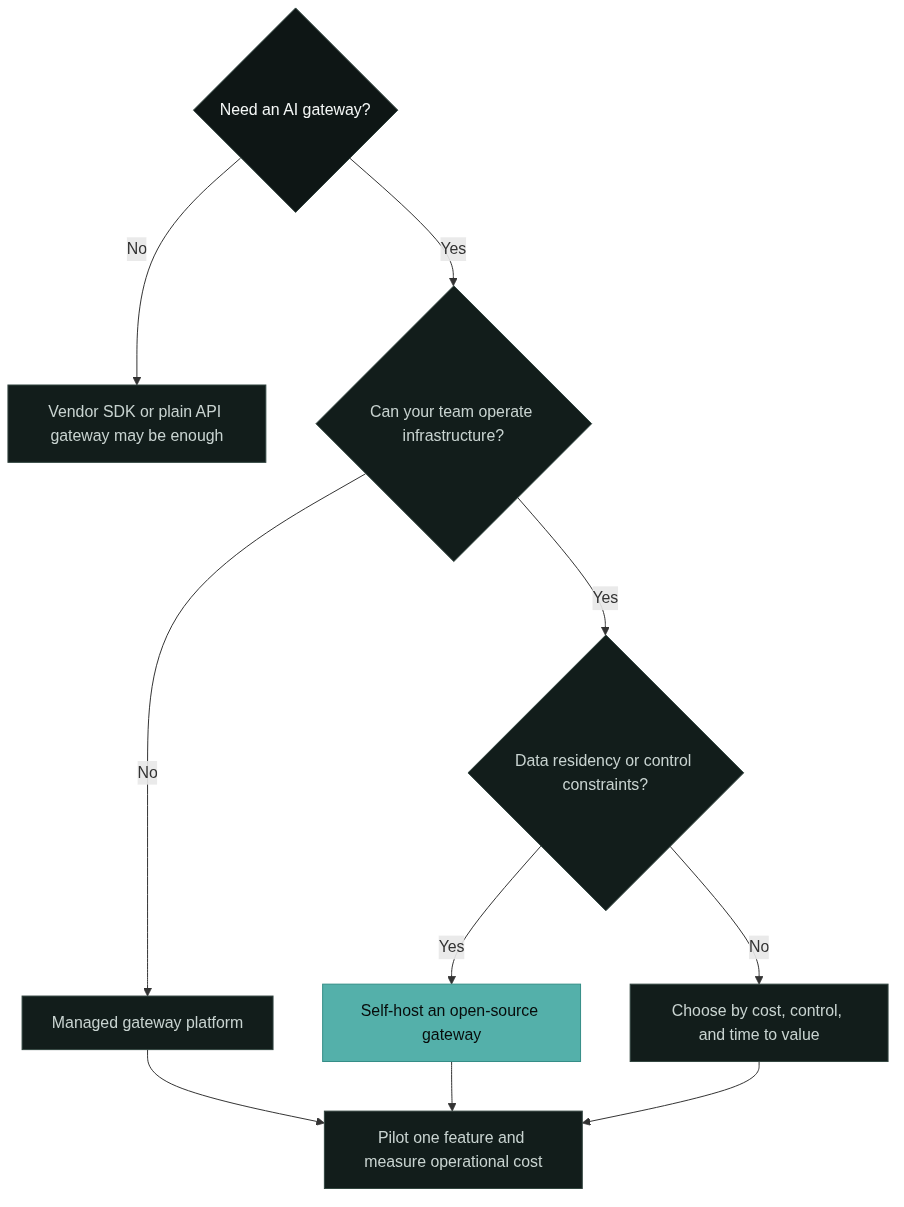
| Infrastructure ownership | Your team | Vendor |
| Updates | You test and apply [1] | Vendor applies |
| Monitoring | You build and run | Included [5] |
| Scaling | You plan and operate | Vendor scales |
| Security | You own keys and patching | Vendor owns runtime |
| Control and customization | Full, at a maintenance cost | Limited to vendor surface |
| Data residency | Your infrastructure | Vendor region policy |
| Cost structure | Infra plus labor | Predictable subscription [4][5] |
| Time to first value | Slower, operations first | Faster, integration first |
| Best fit | Teams with platform skills | Teams without ops capacity |
Two conclusions follow. Choose self-hosting when control, data residency, or cost-at-scale dominate, and your team can operate it. Choose managed when time to value, predictable cost, or limited team capacity dominate. Mixed teams often start with a managed gateway for a feature, prove the value, and later move to self-hosting where the control matters. The ownership map below shows who carries each operational area in the two paths.
Which Teams Fit Which Path
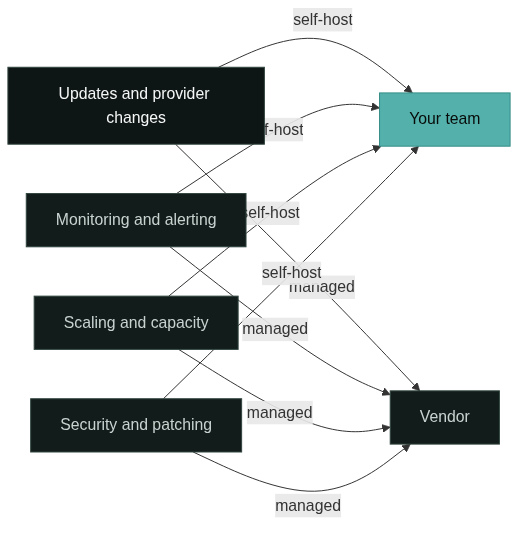
The decision reduces to three questions. Can your team operate infrastructure, including on-call? Do you have data or compliance constraints that a vendor cannot meet? Is gateway control a strategic need, or just a means to an end?
Teams that answer yes to the operations question and need control should self-host an open source ai gateway, and the open-source options above are the place to start. Teams that cannot operate infrastructure, or that need a gateway this quarter, should use a managed platform; the best AI gateways comparison covers the managed landscape. Teams in the middle should pilot one path with a single feature and measure the operational cost before committing production traffic. The decision flow below summarizes the questions.
Responsibility Boundary: Gateway vs Router
One boundary keeps this article honest: the decision here is about the gateway layer, not about LLM routers. A router picks between providers for each request; an open-source AI gateway is the wider layer that also owns keys, policy, usage, and reliability. If your actual need is per-request provider selection, you are looking at the router topic, and the gateway decision framework does not apply to it. The what is an AI gateway guide draws that line between the layers.
FAQ
Is an open source ai gateway free to run?
The software is free to download, but running it is not. You pay for compute, storage, and the engineering time to operate, monitor, and upgrade it [2]. A managed gateway replaces most of that labor with a subscription, which is why the comparison is about total cost, not license price.
Which open-source AI gateway should I start with?
Start with the project that matches your deployment and skill set. LiteLLM is a good default for teams that want a dedicated model gateway with the widest provider coverage [1][2]. Portkey’s gateway fits teams that want routing and observability with a managed option available later [3][4]. Teams already on Kong should evaluate its AI plugins before adding a second product [6].
When does self-hosting stop making sense?
Self-hosting stops making sense when the operations burden exceeds the control benefit: no in-house platform skills, a small team, or a deadline that does not allow building the monitoring and on-call practice. At that point a managed gateway reaches production faster and predictably, and the best AI gateways comparison is the right next read.
References
BerriAI, “LiteLLM,” GitHub repository. github.com/BerriAI/litellm. Open-source AI gateway with an MIT core license, an enterprise directory under a separate license, and a large catalog of LLM providers.
BerriAI, “LiteLLM Documentation.” docs.litellm.ai. Official documentation covering the proxy server, virtual keys, spend tracking, budgets, guardrails, load balancing, and Docker, Helm, and Terraform deployment.
Portkey, “AI Gateway.” portkey.ai. Public documentation for the open-source gateway covering the universal API, routing, fallbacks, and observability.
Portkey, “Product Feature Comparison.” portkey.ai. Feature and pricing comparison covering the free, Pro, and enterprise tiers of the managed control plane.
Cloudflare, “AI Gateway.” developers.cloudflare.com. Official product documentation for a managed AI gateway available on all Cloudflare plans.
Kong, “How AI Proxies Cut Development Costs.” konghq.com. Kong engineering blog describing AI proxy and transformer plugins on the Kong Gateway and the enterprise AI offering.
Kong, “Kong,” GitHub repository. github.com/Kong/kong. Open-source API gateway repository under the Apache-2.0 license.
Next Steps
Run the three questions before reading more: can your team operate infrastructure, are there data or compliance constraints, and is gateway control strategic? The answers point to one column of the matrix, and the pilot is the same either way: route one non-critical feature through the candidate open source ai gateway or managed path and measure the operational cost for a month.
If you are still mapping the terms, read what is an AI gateway to confirm the gateway layer is what you need. When you are ready to compare implementations, read the GoModelHub documentation to see how a managed, unified, OpenAI-compatible model access platform fits the decision matrix above, and explore GoModelHub to evaluate it against your shortlist.