

What an API Gateway Is
A traditional API gateway is a reverse proxy that fronts a set of web services. It receives client requests, authenticates them, applies rate limits, transforms requests and responses, and forwards each call to the right service based on the URL path, host, or headers [1]. API teams use it to keep client traffic, service discovery, and policy enforcement in one place instead of repeating them in every service.
The gateway is endpoint-aware, not workload-aware. It knows that /orders maps to the order service and that this client is allowed ten requests per second, but it does not care what the service computes. That separation is a strength: the gateway stays generic, and the services stay independent.
What an AI Gateway Is
An AI gateway is the same kind of front door, but for AI model calls. It exposes one API to your application, manages provider credentials, normalizes requests, routes each call to a model, meters token usage, and applies fallbacks and policy around model calls [3][4]. Vendors describe it as a control layer between applications and the models they depend on [4].
The defining difference from an API gateway is that the AI gateway understands the workload. It knows what a model call is, how many tokens it consumed, which provider is cheapest for this request, and what to do when a provider fails. Those concepts have no equivalent in a traditional API gateway, because web services do not charge by token or fail with provider-specific rate limits.
If the term is new to you, the broader pattern is covered in what is an AI gateway, which explains the full capability set and how it relates to LLM gateways, routers, and proxies.
Where the Two Layers Overlap
The overlap is real and useful to name. Both layers handle authentication, rate limiting, request normalization, observability, and a single entry point for clients [2][1]. If your team already runs an API gateway, some of the plumbing an AI gateway would do is already in place: TLS termination, API keys, request logging, and basic routing.
The overlap is also where vendors muddy the terms, so the ai gateway vs api gateway question is best answered by job description rather than by product name. Do not compare product names; compare which of the two job descriptions the tool actually performs. The question that separates them is not whether the tool can proxy traffic, but whether it models AI-specific concerns like tokens, model fallbacks, and provider cost.
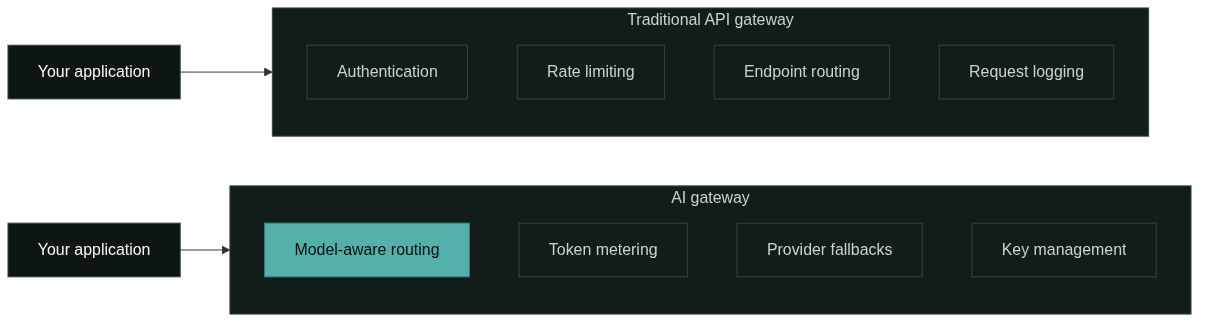
The Routing Difference: Endpoint-Aware vs Model-Aware
Routing is the clearest divergence. An API gateway routes by address: a path, a host, or a header decides which backend receives the request [1]. The decision is static and cheap, and the backend set changes rarely.
An AI gateway routes by model and intent. A request can be forwarded by explicit model name, or the gateway can pick a model by cost, capability, or latency, and it can retry or fall back to another provider when one fails [3][5]. The routing table is a model catalog that changes as providers add models and change prices, so the decision logic is more dynamic than URL-based routing.
For teams evaluating tooling, the practical test is simple: can the layer express “use the cheaper model for this request, and if the provider errors, retry with the fallback”? If the answer is no, it is an API gateway doing generic routing, whatever the marketing page says.
Token and AI Usage Concerns
Token metering has no parallel in traditional web APIs. Every model call consumes input and output tokens that map directly to cost, so an AI gateway records token counts, request volumes, and spend per model, project, and time period [5]. That data feeds cost alerts, per-project budgets, and routing policies that push routine traffic to cheaper models.
A traditional API gateway can log request counts and bytes, but it cannot attribute cost to model output or warn you that one feature is burning budget. The visibility gap shows up in practice: a runaway loop calling a large model appears as a cost spike in the AI gateway usage view, while an API gateway would only show a rising request count without a price tag.
Security and Policy Differences
Both layers enforce authentication, but they protect different assets. An API gateway guards your services: it checks that callers are allowed, limits abuse, and hides internal topology [2]. An AI gateway additionally protects model access: it stores provider keys centrally, scopes keys by project and environment, and can enforce which models a team is allowed to call [4].
The policy model differs too. Web API policy tends to be about rates, quotas, and access to endpoints. AI policy adds budget caps, token limits per project, and model allowlists, because a misconfigured loop can cost more than a traffic spike can. If your platform team already owns API policy, adding AI policy means extending the same governance instincts to a new resource type.
Observability Differences
Observability is where the two layers produce different questions. An API gateway gives you request volume, latency, error rates, and backend health for web services [1]. That is the right lens for a service mesh.
An AI gateway gives you model-level telemetry: which model answered, how many tokens it used, what it cost, how often a provider failed, and which fallback took over [3][5]. Teams debugging a slow or expensive AI feature need this view, because the failure is usually in a specific provider-model combination rather than in the gateway infrastructure itself.
The two can feed the same dashboard, but they answer different questions. Log both layers, and keep the model-level metrics separate from service-level metrics so a cost or quality problem does not get buried in generic traffic graphs.
Can an API Gateway and an AI Gateway Coexist?
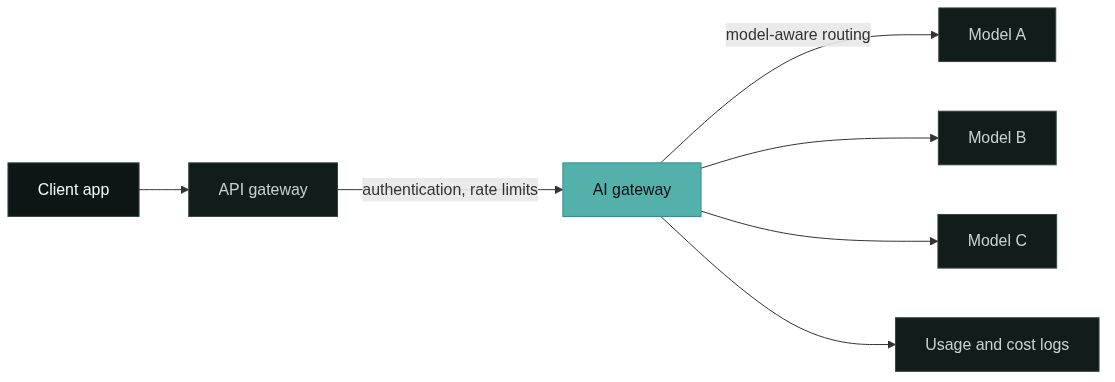
Yes, and production stacks often run both. The API gateway owns the edge: TLS, client authentication, and routing to internal services. The AI gateway sits behind it and owns model traffic: routing, keys, metering, and fallbacks. The request path is client to API gateway to AI gateway to model provider, and each layer keeps the job it is good at.
Coexistence adds a small operational cost: two layers to deploy, monitor, and update. That cost is usually acceptable when the API gateway was already there, because adding AI handling to a generic gateway often means reimplementing token metering and model fallbacks in a layer that was not designed for them. The diagram below shows the layered path.
When a Traditional API Gateway Is Enough
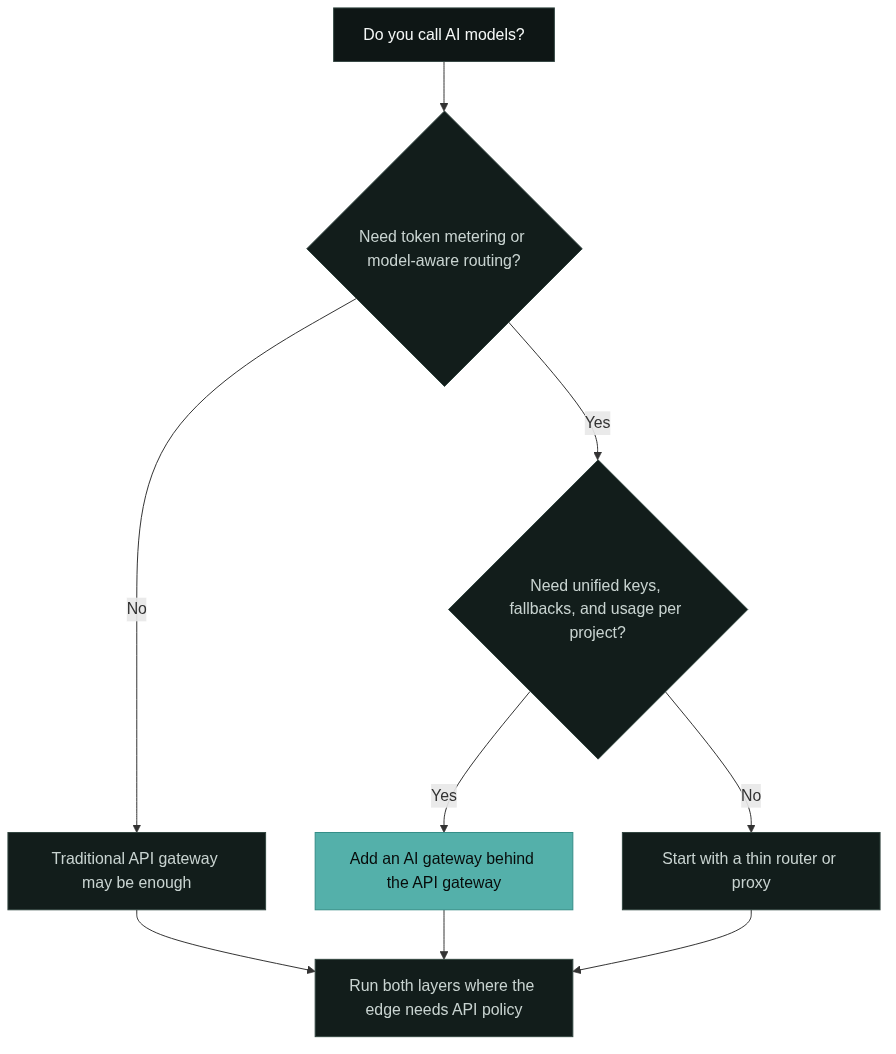
Stay with the API gateway alone when your workload does not need model awareness. A product that calls one model through its vendor SDK, or a few models through one provider, gets little from an AI gateway: there is one integration, one key, and no routing or fallback matrix to manage.
The same applies when AI is an occasional feature rather than a core path. If your API gateway already proxies the AI calls and you only need rate limits and logging, adding a second layer is configuration without much benefit. Revisit the decision when the second provider enters, the cost of a single model becomes material, or a provider outage starts taking down the feature.
When to Add an AI Gateway
Add an AI gateway when the model traffic starts behaving like a real workload: more than one provider, per-project key management, cost visibility, or fallback requirements. The trigger points are the same ones that justify any gateway: repeated logic that would otherwise be copied into every service.
A common entry point is cost and reliability. Once a team is calling several models and provider errors are visible to users, the AI gateway earns its place by centralizing fallbacks, usage metering, and model selection. You do not have to move every call on day one; route one feature through it, verify the usage data, then expand.
AI Gateway vs API Gateway: A Decision Matrix
The matrix below summarizes the decision for the most common scenarios. Each row assumes a specific situation so you can find the row that matches your stack.
| Scenario | What you need | Recommendation |
|---|---|---|
| One provider, one model, prototype | Vendor SDK, basic logs | API gateway optional; no AI gateway |
| One provider, several models, shared keys | Unified key and usage view | Thin AI layer or AI gateway |
| Multiple providers, cost-sensitive calls | Token metering, model routing, fallbacks | AI gateway behind your API gateway |
| Web APIs plus one AI endpoint | Rate limits and logging for the API | API gateway alone, AI calls proxied through it |
| Strict governance: budgets, model allowlists | Per-project AI policy | AI gateway, with the API gateway at the edge |
The pattern behind the rows is consistent: the API gateway stays at the edge, and the AI gateway is added when model-specific controls become the bottleneck. For the detailed request path inside the AI layer, the AI gateway architecture guide walks through each component in order.
FAQ
Do I need both an API gateway and an AI gateway?
Often yes. The API gateway handles client-facing concerns such as authentication and rate limits, while the AI gateway handles model routing, token metering, and fallbacks. Start with the AI gateway when model traffic is your only concern, and keep the API gateway at the edge when you also expose web services.
Is an AI gateway just an API gateway for AI APIs?
The label is used loosely, but the job differs. An API gateway routes and protects web services, while an AI gateway understands model calls, tokens, provider fallbacks, and per-model cost. A generic gateway can proxy AI traffic, but it does not model those concerns.
When should I not add an AI gateway?
When you call one model through one provider and have no routing, cost, or fallback requirements, an AI gateway is extra infrastructure. Revisit the decision when the second provider, per-project budgets, or provider outages enter the picture.
References
AWS, “What is Amazon API Gateway?,” docs.aws.amazon.com. Official documentation describing the API gateway pattern: authentication, rate limiting, request transformation, and routing to backend services.
Nginx, “What is an API Gateway?,” nginx.com. Public technical guide to the traditional API gateway and its responsibilities for web APIs.
Kong, “What is an AI Gateway?,” konghq.com. Vendor explanation of the AI gateway as a layer combining routing, access control, and observability for AI workloads.
Google Cloud, “AI Gateway,” cloud.google.com. Official product page describing AI Gateway as a managed layer for accessing multiple generative AI models through a unified API.
Portkey, “AI Gateway Documentation,” portkey.ai. Public documentation covering unified API access, routing, fallbacks, and usage tracking for LLM workloads.
Next Steps
Start by writing down what your AI calls actually need today: one provider or several, shared keys or per-project keys, manual routing or fallback rules, and whether a model outage would take down a feature. Compare that list against the decision matrix above before choosing a layer.
If you are still mapping the terminology, read what is an AI gateway for the full capability set. When you are ready to evaluate a unified model access layer, browse the models catalog or read the documentation to see how one API connects to the models you need.