

How We Compared AI Gateways
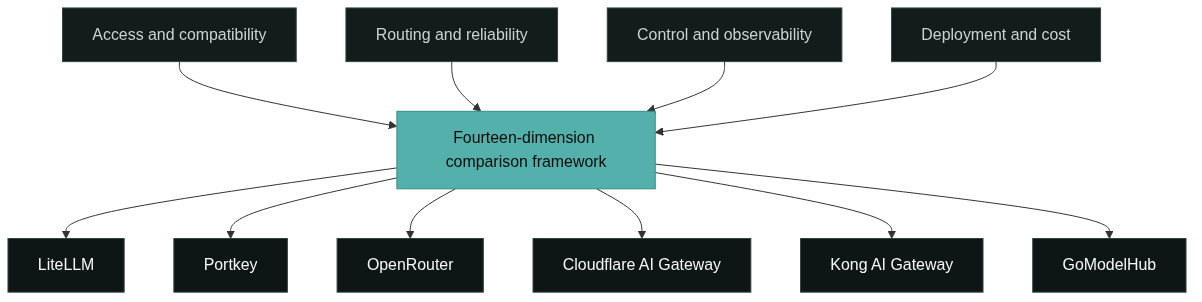
The comparison uses one framework across all products so the rows line up and the best AI gateways can be judged on the same evidence, not vendor feature lists. For every gateway we examined the same fourteen dimensions: models and providers, unified API, OpenAI compatibility, routing, reliability and fallbacks, observability, usage and cost visibility, guardrails and policy, BYOK support, self-hosting, developer experience, pricing model, best-fit user, and main trade-offs.
The dimensions group into four concerns. Access and compatibility: which models a gateway can reach and how standard the API is. Routing and reliability: how a request is directed and what happens when a provider fails. Control and observability: logs, spend, guardrails, and key management. Deployment and cost: managed versus self-hosted, and how you pay.
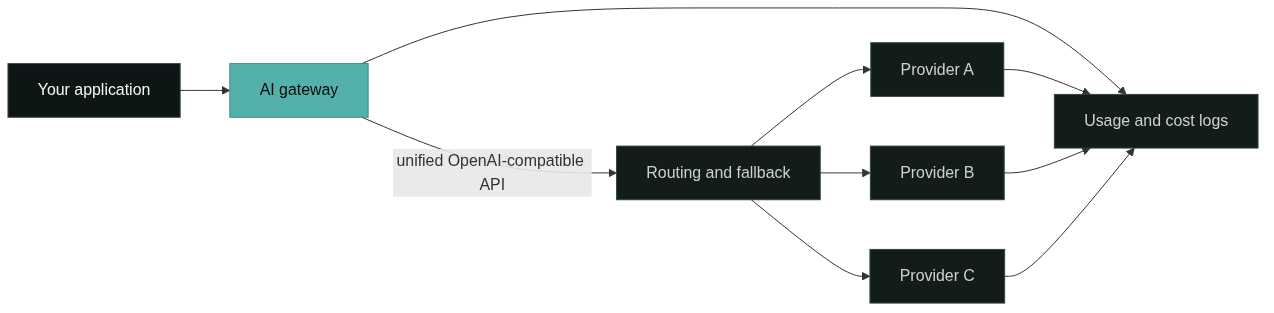
We deliberately did not rank the products. A gateway that is excellent for a regulated enterprise can be the wrong default for a two-person startup, so the matrix records what each tool offers and the framework decides fit. If the category is new to you, what is an AI gateway explains the underlying pattern first.
LiteLLM: Open-Source Gateway with the Widest Provider Coverage
LiteLLM is an open-source AI gateway from BerriAI that exposes one OpenAI-format API across a large catalog of LLM providers [1]. Because it normalizes requests and responses, teams can point the same code at managed APIs and open-weight models. The proxy server adds enterprise controls on top of the SDK: virtual keys, spend tracking, budgets, guardrails, and an admin dashboard [2].
Routing and reliability are handled at the proxy layer with load balancing, retries, and fallbacks, so a failing deployment can shift traffic to a healthy one without changing application code [2]. Observability covers per-key usage, token counts, and cost, which feeds the budget controls. BYOK is the default model: you bring provider keys and LiteLLM wraps them in virtual keys for your team.
Deployment is where LiteLLM demands the most from you. It runs in your infrastructure via Docker, Helm, or Terraform on AWS and GCP, and you own upgrades, monitoring, and scaling [2]. Pricing is the cost of operating that infrastructure rather than a subscription. Best fit: platform teams with the operational capacity to run a gateway, who want wide provider coverage and full control. Main trade-offs: self-hosting is your responsibility, and the feature surface is broader than a thin router.
Portkey: Managed Control Plane with Routing and Observability
Portkey is an AI gateway that pairs a universal API with a control plane for routing, observability, and guardrails [3]. The open-source gateway can be self-hosted, while the managed service adds dashboards, alerts, and team management without infrastructure work. It supports models from major providers and open-source families through one API format.
Routing is the centerpiece: conditional routing, load balancing, and automatic fallbacks let you direct traffic by model, cost, or capability and recover when a provider errors [3]. Observability includes request logs and traces, and usage data is tracked per key and workspace. Guardrails and policy controls sit alongside the routing rules rather than in a separate system.
Pricing scales with request volume: a free developer tier, a paid Pro tier with a higher monthly request allowance, and custom enterprise plans [3]. BYOK is supported in both self-hosted and managed modes. Best fit: teams that want routing and observability working out of the box without running a proxy themselves. Main trade-offs: the richest features sit on paid plans, and a managed control plane means your traffic metadata passes through Portkey’s platform.
OpenRouter: One API Key for Many Models with No Markup
OpenRouter is a managed provider API that gives every model on the platform a single endpoint and one credit balance [4]. It implements the OpenAI API specification, so any OpenAI-compatible SDK works with only a base URL change. The model catalog is broad, and each model lists per-token pricing openly.
OpenRouter passes through provider pricing without markup and charges a fee when you purchase credits, which keeps the cost model transparent [4]. Routing is available through model variants and provider sorting: for example, a price-first or throughput-first variant for the same model, plus free models with low rate limits for experimentation [4]. BYOK is supported with a plan-dependent free allowance and a fee on usage above the allowance [4].
There is no self-hosting option, and analytics focus on activity and usage rather than full trace-level observability. Best fit: individual developers and small teams that want one key for many models with minimal setup and transparent pricing. Main trade-offs: you do not own the infrastructure, free models are rate limited, and heavy BYOK usage accrues fees.
Cloudflare AI Gateway: Edge-Native Layer for Existing Cloudflare Users
Cloudflare AI Gateway provides a unified API in front of providers such as OpenAI, Anthropic, Google, and Replicate, with logging, caching, rate limiting, retries, and model fallbacks handled at the edge [5]. Integration is deliberately small: for many users it is a one-line change to the base URL of an existing OpenAI-compatible call.
The edge placement is the differentiator. Requests are routed through Cloudflare’s network, caching can cut repeated calls, and analytics report requests, tokens, and estimated cost per route and provider [5]. Because it runs on Cloudflare’s infrastructure there is nothing to operate, and it is available on all Cloudflare plans, including the free tier.
The trade-off is scope. Cloudflare AI Gateway is a gateway layer rather than a full AI platform: guardrails, budgets, and key governance are thinner than in dedicated control planes, and you are building on Cloudflare’s ecosystem. Best fit: teams already on Cloudflare that want fallbacks, caching, and cost analytics with a minimal code change. Main trade-offs: less routing and policy depth than dedicated gateways, and reliance on the Cloudflare stack.
Kong AI Gateway: AI Features Inside an Enterprise API Platform
Kong approaches AI gateways as an extension of its API gateway platform. AI proxy and transformer plugins let Kong Gateway front model providers alongside regular web APIs, so teams that already standardize on Kong can add AI traffic without introducing a second vendor [6]. Major providers are covered through plugin configuration.
The strengths come from the existing platform: routing, rate limiting, retries, authentication, and observability that Kong teams already run, now applied to model calls. Advanced AI plugins are part of the enterprise offering, while the open-source gateway remains available for self-hosting [6]. Token-level metering and cost attribution are less native than in gateways built specifically for model traffic, because the platform’s data model is API-oriented.
Best fit: enterprises with an established Kong deployment that want AI capabilities inside the gateway they already operate, with enterprise support. Main trade-offs: advanced AI features require the commercial tier, and AI-specific usage and cost visibility is not the platform’s native strength.
GoModelHub: Unified Model Access with Usage and Key Management
GoModelHub is a multi-model API access and management platform that connects different AI models through one OpenAI-compatible API, with API key management and per-project usage tracking. Developers create a key, point their client at the GoModelHub base URL, choose a model, and see request and token usage per model, project, and time period in one dashboard.
The platform is designed for teams that want the integration benefits of a gateway without operating one: switching models means changing a parameter rather than rewiring integrations, and costs are visible per project instead of buried in provider invoices. Documentation, sample code, and standardized error messages are part of the product, and pricing is published per model on the platform’s pricing pages.
Best fit: developers and AI teams that want a unified model access layer with clear usage and cost visibility, and prefer a managed platform to self-hosted infrastructure. Main trade-offs: as a newer platform, its model catalog and feature depth should be checked against your specific providers, and managed-platform trade-offs apply.
Best AI Gateways in 2026: The Unified Comparison Matrix
The matrix below maps the best AI gateways of 2026 across the fourteen dimensions used in this comparison. Cells are deliberately terse; the product sections above carry the detail and the numbered sources.
| Dimension | LiteLLM | Portkey | OpenRouter | Cloudflare AI Gateway | Kong AI Gateway | GoModelHub |
|---|---|---|---|---|---|---|
| Models / Providers | 100+ providers [1] | Major and open-source models [3] | Broad model catalog [4] | OpenAI, Anthropic, Google, more [5] | Major providers via plugins [6] | Multiple models, one platform |
| Unified API | OpenAI format for all [1] | Universal API [3] | One API, one key [4] | Unified API [5] | AI plugins on gateway [6] | One API |
| OpenAI compatibility | Native [1] | Yes [3] | Drop-in [4] | Yes [5] | Yes [6] | Yes |
| Routing | Load balancing, model routing [2] | Conditional routing [3] | Variants and sorting [4] | Model fallbacks [5] | Gateway routing [6] | Model switching |
| Reliability / Fallback | Retries and fallbacks [2] | Automatic fallbacks [3] | Provider pooling [4] | Retries and fallbacks [5] | Gateway retries [6] | Managed platform |
| Observability | Logs and dashboard [2] | Logs and traces [3] | Activity dashboard [4] | Requests, tokens, cost [5] | Gateway analytics [6] | Usage per model and project |
| Usage / Cost visibility | Spend and budgets [2] | Per-key usage [3] | Credits, no markup [4] | Cost analytics [5] | API-oriented logs [6] | Token usage and billing |
| Guardrails / Policy | Guardrails [2] | Guardrails [3] | Privacy controls [4] | Rate limits [5] | Policy plugins [6] | Key and project management |
| BYOK | Yes, virtual keys [2] | Yes [3] | Yes, fee above allowance [4] | Yes [5] | Yes [6] | Not claimed |
| Self-hosting | Docker, Helm, Terraform [2] | Open-source gateway [3] | No | No, edge-only [5] | OSS and enterprise [6] | Not claimed |
| Developer Experience | Python SDK and proxy [1] | One-line integration [3] | OpenAI SDK compatible [4] | One-line change [5] | Familiar gateway flow [6] | Docs and sample code |
| Pricing Model | Open source | Free, Pro, Enterprise [3] | Credit-based [4] | All Cloudflare plans [5] | OSS and enterprise [6] | Per-model pricing |
| Best-fit User | Self-hosting platform teams | Teams wanting managed routing | Individual developers | Cloudflare-based teams | Enterprise API teams | Developers and AI teams |
| Main Trade-offs | Operations burden | Paid plan limits | No self-hosting | Ecosystem lock-in | Enterprise plugins | Newer catalog |
Among the best AI gateways, two patterns stand out. The open-source gateways, LiteLLM and Portkey’s gateway, maximize control and provider coverage at the cost of operations, while the managed platforms, OpenRouter, Cloudflare, and GoModelHub, minimize setup and favor ease of use. Kong sits between the two because it reuses an existing API platform rather than building a model-specific control plane. For the deeper managed-versus-self-hosted decision, what is an LLM proxy separates the related terms of gateway, proxy, and router.
A Selection Framework for Choosing an AI Gateway
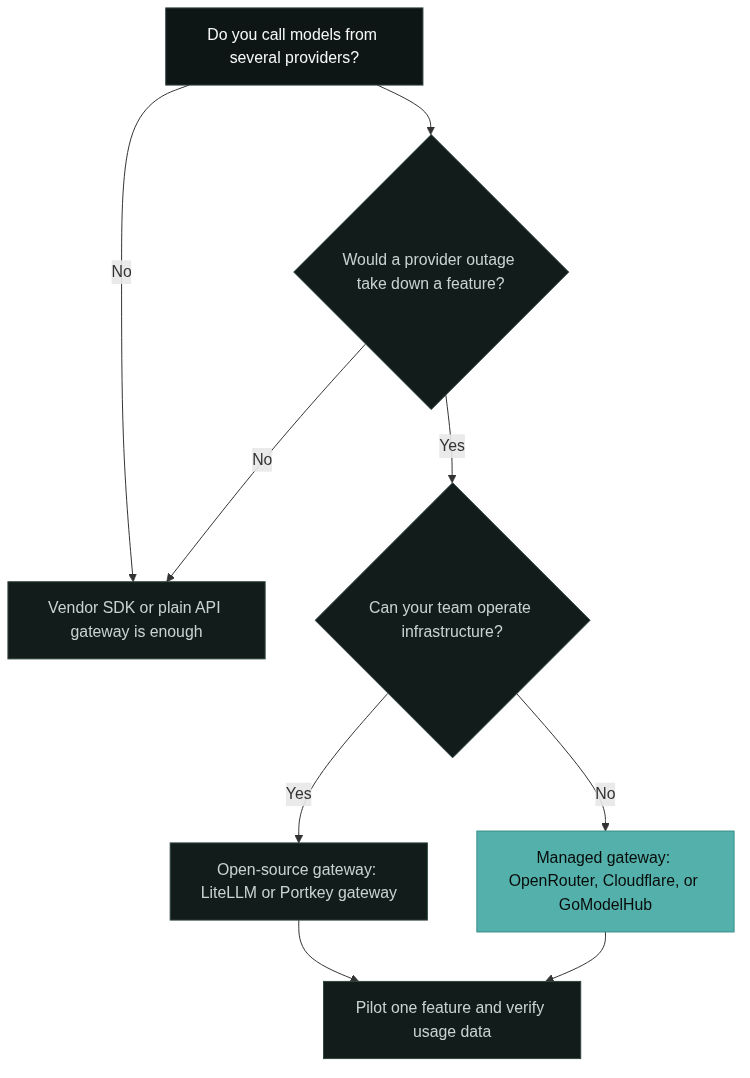
Use the framework in four steps; the decision flow below shows the same logic as a diagram. First, count your providers and your failure tolerance. One provider and one model do not justify a gateway; several providers, or a provider outage that takes down a feature, do. Second, decide managed versus self-hosted before comparing features. If your team can operate infrastructure, LiteLLM or Portkey’s open-source gateway keep data in your control. If not, a managed platform is the realistic choice.
Third, rank the control dimensions that matter to your compliance and finance teams: cost visibility per project, guardrails and budgets, and BYOK. The matrix rows let you compare these directly instead of re-reading vendor pages. Fourth, pilot with one feature: route a single non-critical call through the shortlisted gateway, verify the usage data matches the provider invoice, and then expand.
No single product wins every scenario. Among the best AI gateways, the deciding factor is whether the trade-offs match your operational capacity, provider mix, and cost governance needs. Start with the matrix, apply the four steps, and let a small pilot confirm the choice before you commit production traffic.
FAQ
Which of the best AI gateways is easiest to start with?
For a first integration, the managed options require the least setup. OpenRouter works with any OpenAI-compatible SDK and gives one key for many models; Cloudflare AI Gateway is a one-line change for teams already on Cloudflare; GoModelHub offers a unified API with usage tracking for teams that want a single dashboard. Self-hosted gateways such as LiteLLM are straightforward to install but require you to operate them.
Can I use my own provider keys with these gateways?
Most of the best AI gateways support BYOK. LiteLLM wraps provider keys in virtual keys, Portkey supports BYOK in self-hosted and managed modes, OpenRouter offers a BYOK allowance with a fee above it, and Cloudflare lets you use your own provider keys. Check the current terms, because allowances and fees change.
When should I avoid an AI gateway entirely?
When you call one model through one provider and have no routing, cost, or fallback requirements, a gateway is extra infrastructure. A vendor SDK or a plain API gateway handles that case. Revisit the decision when the second provider appears, per-project budgets become material, or a provider outage starts taking down a feature.
References
BerriAI, “LiteLLM,” GitHub repository. github.com/BerriAI/litellm. Open-source AI gateway exposing an OpenAI-format API across a large catalog of LLM providers.
BerriAI, “LiteLLM Documentation.” docs.litellm.ai. Official documentation covering the proxy server, virtual keys, spend tracking, budgets, guardrails, load balancing, and Docker, Helm, and Terraform deployment.
Portkey, “Product Feature Comparison.” portkey.ai. Public documentation covering the universal API, conditional routing, load balancing, fallbacks, observability, guardrails, and pricing tiers.
OpenRouter, “Frequently Asked Questions.” openrouter.ai. Official FAQ describing the unified OpenAI-compatible API, pass-through pricing, credit fees, model variants, free models, and BYOK allowances.
Cloudflare, “AI Gateway.” developers.cloudflare.com. Official product documentation covering the unified API, logging, caching, rate limiting, retries, model fallbacks, and analytics across providers.
Kong, “How AI Proxies Cut Development Costs.” konghq.com. Kong engineering blog describing AI proxy and transformer plugins on the Kong Gateway and the enterprise AI offering.
Next Steps
Summarize your own position before comparing again: provider count, whether you can operate infrastructure, which cost and governance dimensions matter, and which feature is safe to pilot. That list turns the matrix into a shortlist of the best AI gateways for your situation.
If the terminology is still unclear, read what is an AI gateway for the full capability set, and what is an LLM proxy when you need to separate gateway, proxy, and router. When you are ready to evaluate a unified model access layer, explore GoModelHub, browse the models catalog, and get an API key to start building.