

What Is an LLM Proxy?
An LLM proxy is a thin service that sits between your application and an LLM provider’s API. Your application talks to the proxy as if it were the model endpoint; the proxy forwards the request to the real provider and passes the response back [2]. The application never needs to know the provider’s address, and the provider never sees the application’s request directly.
The core value is a single point of control. You change the proxy configuration instead of redeploying the application when a provider endpoint or key changes. A reverse proxy is not an AI-specific idea; the same pattern has been used for web services for decades [1]. What makes an LLM proxy distinctive is the payload: model requests carry API keys, tokens, and usage data, so the proxy’s job quickly extends beyond plain forwarding [3].
Reverse Proxy Basics
A reverse proxy is a server that fronts other servers and forwards client requests to them [1]. The client thinks it is talking to the proxy; the proxy decides which origin receives the request. The origin server is hidden behind it, which is why this pattern is used for load balancing, TLS termination, and access control in conventional infrastructure [1][2].
An LLM proxy applies the same idea to model APIs. The proxy terminates your request, injects or manages the provider key, forwards the call, and returns the result. That arrangement gives you one place to enforce timeouts, retries, and basic logging without touching the application or the model provider.
Why LLM Applications Need a Proxy Layer
Applications that call models directly embed provider keys and endpoints in code or environment configuration. That works for a prototype, and it becomes a problem as soon as more than one service calls models: keys spread across services, the provider endpoint is hard to change, and there is no single place to see what is being sent.
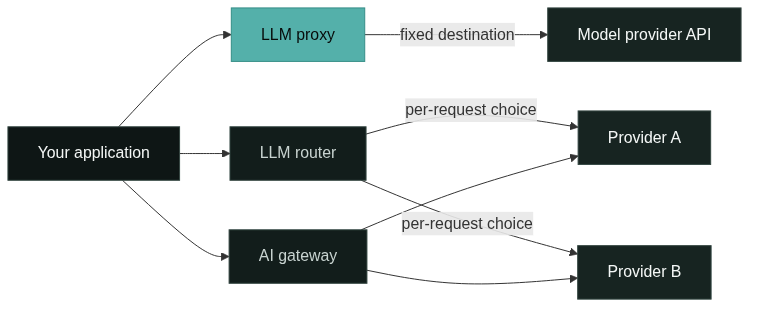
A proxy layer solves those three problems at once. You keep provider keys in the proxy, give every service one base URL, and get request logs in one location. Teams typically adopt a proxy first for key management and a stable endpoint, then discover that the same layer can carry retries, timeouts, and format normalization [3]. The diagram below shows where each layer sits in the request path.
Typical Proxy Responsibilities
The core responsibilities of an LLM proxy are forwarding, key management, and basic resilience:
- Forwarding requests to a configured provider endpoint and returning the response unchanged [2].
- Holding provider API keys so applications never store them [3].
- Applying timeouts, retries, and request size limits.
- Logging requests and basic usage counts.
Notice what is not on this list: choosing which model to call, tracking spend per team, or enforcing usage budgets. A plain proxy forwards to a fixed destination. The moment you add per-request model selection, you have moved into router territory; the moment you add team keys, budgets, and policy, you are describing a gateway.
LLM Proxy vs LLM Router
An LLM router adds a decision layer that a plain proxy does not have: it chooses which model or provider handles each request, based on rules, cost, latency, or availability [4]. A proxy asks “where do I send this request?” once, at configuration time. A router asks that question for every request, and it usually includes fallback behavior when the first choice fails [4].
The two layers are often combined, which is where the confusion starts. Open-source projects commonly ship routing on top of a proxy server, so “proxy” ends up meaning “proxy plus routing” in practice [3][4]. If your need is genuinely per-request provider selection, the dedicated LLM router guide covers the design in depth; the distinction here is that a router is a selection layer, not a forwarding layer.
LLM Proxy vs AI Gateway
An AI gateway is the widest of the three layers. It includes proxy-style forwarding and router-style selection, and it adds the platform concerns that a single proxy or router does not: virtual keys and team budgets, usage and cost tracking, guardrails, policy enforcement, and observability [5]. LiteLLM’s proxy server and Portkey’s AI gateway are both examples of software that started with forwarding and now ship much of that broader surface [3][5].
The practical difference is scope. A proxy serves one integration pattern; a gateway serves an organization. When several teams share model access, when spend needs to be attributed to projects, or when policy must be applied consistently, the gateway layer is what makes that manageable [5]. The AI gateway architecture article walks through the full request path if you want the component-level picture.
Why AI Gateways Cover More Ground
Gateways cover more ground because they are built for platform use, not single-service use. Multiple teams, shared keys, budgets, compliance rules, and production observability create requirements that a thin proxy cannot meet: per-key spend limits, per-project usage reports, model access policies, and centralized failure handling [5].
This is also why “gateway” and “proxy” are not interchangeable in product names. When a vendor calls its product a proxy but documents virtual keys, budgets, and routing, it is describing gateway capabilities under the older term [3]. Recognize the feature list, not the label, when you evaluate options. The responsibility map below compares the three layers side by side.

Why the Three Terms Overlap
The three terms overlap because the layers are nested, not separate. A gateway contains router logic, which itself contains proxy forwarding. Projects that grow from one layer into another keep their original name, so the terminology reflects history more than scope.
The overlap also comes from the shared base: every layer forwards model requests, manages keys at some level, and touches the same API formats [2][5]. The line between them is drawn by what else the software does, which is why two products can both call themselves “proxy” and have very different feature sets. The what is an AI gateway guide draws the boundary from the gateway side.
Why Vendor Terminology Differs
Vendors use different terms because the products come from different starting points. LiteLLM grew from a proxy server and still names its main component the proxy even though it routes, tracks spend, and manages keys [3][4]. Portkey markets an AI gateway and documents routing, fallbacks, and observability under that name [5]. Kong, an API gateway vendor, ships AI proxy and transformer plugins on top of its existing gateway rather than a standalone model proxy [6].
The same feature can therefore appear under three labels. Read the documentation’s feature list and the scope of each product before comparing it to your need, and treat marketing names as a hint rather than a definition.
Which Layer Does Your Team Need?
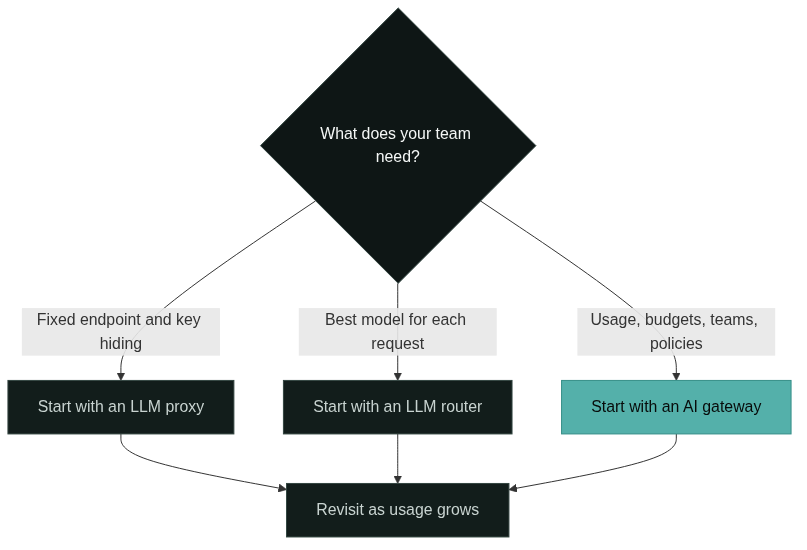
Start from your actual requirement, not the product category:
- If you need one stable endpoint and provider key management, an LLM proxy is enough.
- If you need the best model for each request, with fallback when a provider fails, you need router capabilities [4].
- If you need team keys, budgets, usage reporting, and consistent policy, you need a gateway [5].
Most teams do not stay on the thin layer. A proxy is the fastest start and the natural base; routing and gateway features are added as usage, teams, and cost visibility grow. The decision flow below summarizes the three entry points.
FAQ
Is an LLM proxy the same as an AI gateway?
No. A proxy forwards requests and manages keys; a gateway includes routing, usage tracking, budgets, and policy on top of that base [5]. Products blur the line, so compare feature lists rather than names.
Do I need a proxy if I already use an AI gateway?
No. A gateway already provides proxy-style forwarding as part of its request path [5]. Add a separate proxy only when you need a distinct, minimal layer for a specific integration.
Can an LLM router work without a proxy?
A router must forward requests too, so it includes proxy behavior by necessity [4]. In practice the two are bundled: routing products ship with a forwarding server underneath.
How do I start without overbuilding?
Start with the thin layer that matches today’s requirement, and let the architecture grow with usage [2][3]. A proxy is the smallest commitment; move to a router or gateway when selection logic, teams, or budgets become real needs.
References
Nginx, “What Is a Reverse Proxy Server?” nginx.com. Glossary definition of a reverse proxy as a server that fronts and forwards requests to origin servers.
MDN Web Docs, “Proxy servers and tunneling.” developer.mozilla.org. Explanation of how HTTP proxies mediate requests between clients and servers.
LiteLLM, “Proxy / Server – Quick Start.” docs.litellm.ai. Official documentation for the LiteLLM proxy server, covering virtual keys, spend tracking, and the OpenAI-compatible endpoint.
LiteLLM, “Routing – Load Balancing, Fallbacks.” docs.litellm.ai. Routing documentation describing model selection, load balancing, and fallback behavior.
Portkey, “AI Gateway.” portkey.ai. Product documentation for the AI gateway covering the universal API, routing, fallbacks, and observability.
Kong, “AI Proxy – Kong Plugin Hub.” docs.konghq.com. Plugin documentation describing the AI proxy plugin on Kong Gateway.
Next Steps
Use the three-way map as a checklist: forwarding and keys point to a proxy, per-request selection points to a router, and usage, budgets, and policy point to a gateway. Revisit the decision as your team grows, because most organizations add routing first and gateway capabilities second.
To go deeper on the layers, read what is an AI gateway for the full gateway picture, and the LLM router guide for the routing cluster. For the component-level request path, read AI gateway architecture, and explore the GoModelHub documentation to see how a managed, OpenAI-compatible model access platform implements these layers.