

What Is an LLM Router?
An LLM router is a software layer that sits between an application and multiple AI models, examines each incoming request, and sends it to the model best suited for that call. Instead of hard-coding one model into your code, the router picks the destination at runtime: a short support question can go to a fast, cheap model, while a complex reasoning task can go to a stronger one. The router does not generate responses. Its job is a routing decision: which model should handle this request, and what should happen if that model fails or responds too slowly.
Think of it as a load balancer for model capacity, but with a wider remit. A load balancer distributes traffic across identical servers; an LLM router distributes requests across models that differ in price, speed, capability, and reliability. Some routers are open-source components you deploy yourself, and others are managed services. GoModelHub is built around the same idea: one OpenAI-compatible endpoint that lets you access, switch, and manage multiple models instead of maintaining separate integrations for each provider [1][2].
How a Router Differs from an API Gateway
An API gateway handles authentication, rate limiting, and routing to backend services. An LLM router can do some of that too, but its defining behavior is model selection based on request context. The gateway answers which service owns an endpoint; the router answers which model is the best fit for a request, given cost, latency, and quality targets. A team often places a router behind a gateway, or folds routing logic into the gateway, but the decision logic is a distinct concern.
What Is LLM Routing?
LLM routing is the process of choosing, for each request, which model should process it. The term covers the decision logic, the signals used to make the choice, and the fallback behavior when a chosen model is unavailable. The router is the component that executes the process; routing is the process itself.
Routing can be as simple as a static rule, such as routing every summarization request to one model, or as dynamic as a scored ranking that re-evaluates each request against current cost and latency conditions. What separates routing from ordinary model configuration is that the decision happens per request, at runtime, instead of being fixed at deploy time. That runtime decision is what lets a team ship one application while the model mix behind it evolves.
Why Routing Matters for AI Applications
Most teams reach for a router because a single model stops being enough. The reasons tend to fall into three groups.
First, capability varies by task. One model may produce excellent code but cost too much for casual chat; another may be fast and cheap but weak at long reasoning chains. When a product serves many request types, no single choice is optimal for all of them.
Second, cost and latency are real operating constraints. Sending every request to the largest model inflates the bill and slows responses for simple queries. Routing lets a team spend more per request where quality pays off and less where it does not.
Third, availability becomes a concern. Model providers have outages, rate limits, and degradation windows. An application that depends on one provider can go down with it; an application routed across providers can shift traffic to a healthy alternative, a pattern covered in detail in the guide to LLM fallback.
None of these reasons force a router on every team. A product with one model, one task, and modest traffic can skip the extra layer. The value appears when request diversity or provider risk makes a fixed choice expensive or fragile.
How an LLM Router Works
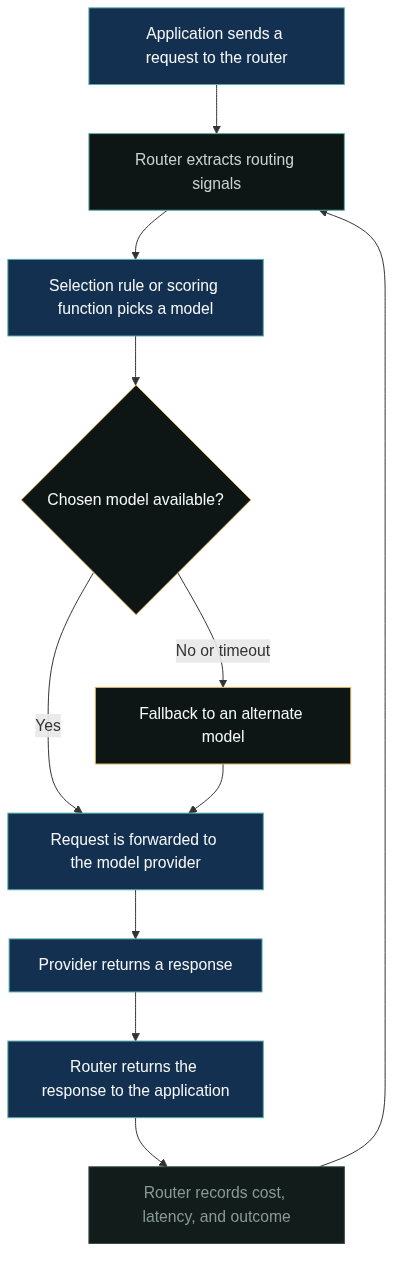
A router follows a small loop on every request. The application sends the request to the router through a standard API, the router inspects the request and extracts routing signals, a selection rule or scoring function picks a model, and the request is forwarded to that provider. When the provider responds, the router returns the response to the application and can record the outcome for future decisions.
Three details matter in practice. First, the router should be transparent to the caller: the application sends one request and receives one response, regardless of which model handled it. Second, the selection step can include fallback: if the chosen model times out or returns an error, the router retries on an alternate model before failing the request. Third, the router should keep observation data, such as per-model cost, latency, and error rates, because those measurements are the raw material for better routing rules later.
The Signals That Drive Routing Decisions
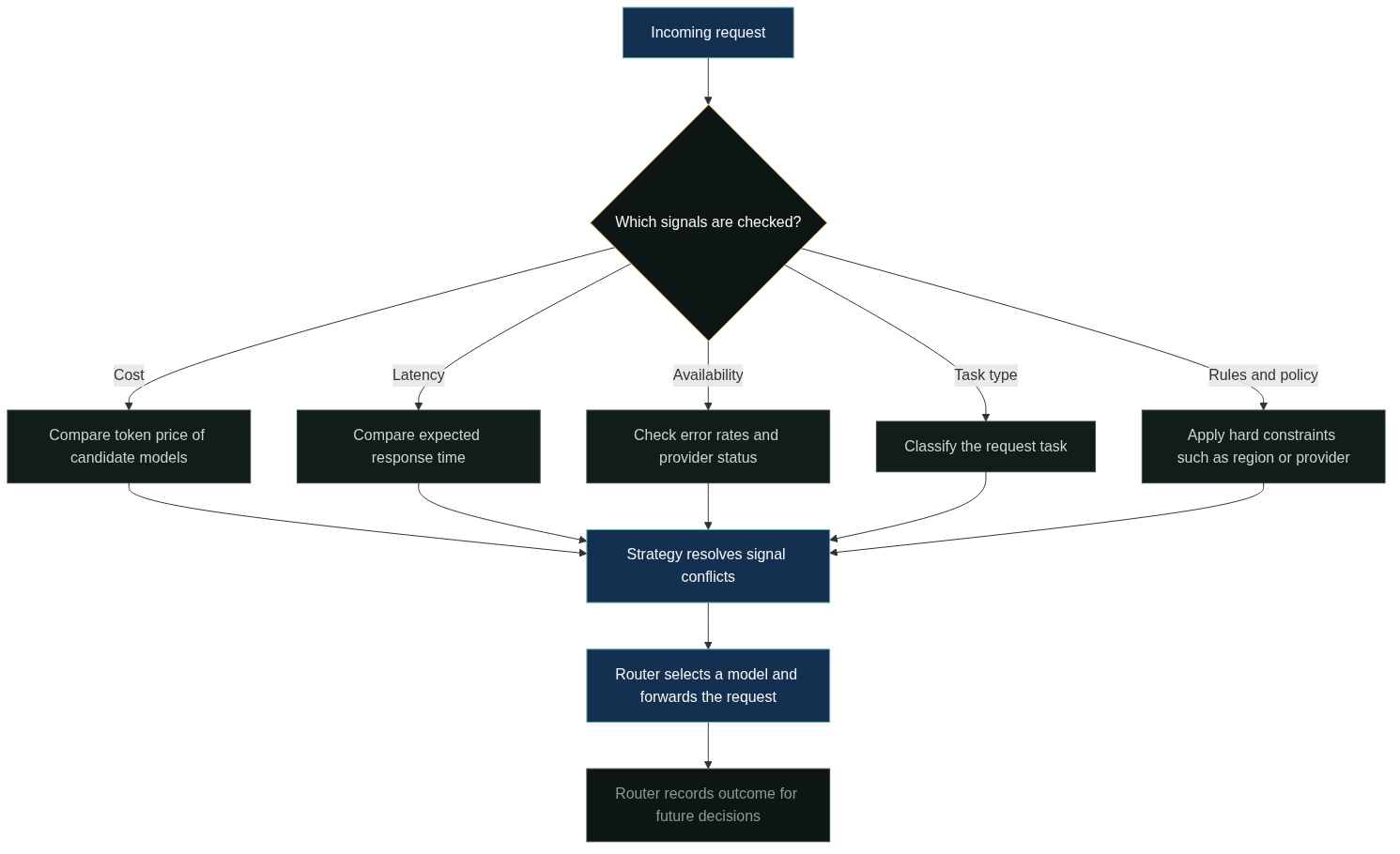
A router needs information to choose well. The signals below are the ones teams most often use, alone or combined.
| Signal | What it tells the router | Typical use |
|---|---|---|
| Cost | Price per token for each candidate model | Route cheap, high-volume requests to lower-cost models |
| Latency | Expected response time per model | Route interactive traffic to faster models |
| Availability | Current error rates and provider status | Route around degraded or failing providers |
| Task type | The kind of work in the request | Route code, chat, extraction, and reasoning to suitable models |
| Rules and policy | Business constraints such as data region or provider | Enforce compliance and internal policy per request |
Cost is the most common starting point because it is measurable and directly visible on the invoice. Latency and availability are usually measured from the router’s own observation data, which is why teams collect per-request telemetry from day one. Task type is more subjective: it requires either rules written by humans or a classifier that guesses the task from the prompt. Policy rules, such as never sending customer data to a specific model, are usually evaluated before any cost or quality scoring, because they are hard constraints rather than preferences.
The trade-off is that signals disagree. The cheapest model may be slow, or the fastest may fail more often. A router resolves the conflict with a strategy, which is where the design choices live. Provider documentation is a useful reference for understanding how models differ along these dimensions, such as OpenAI’s model catalog and Anthropic’s model selection guidance [1][2].
Routing Strategies at a Glance
Routing strategies are the rules that turn signals into a decision. A few families cover most deployments:
- Rule-based routing maps request attributes to fixed models. It is predictable and easy to audit.
- Cost-aware routing prefers cheaper models when quality constraints allow.
- Latency-aware routing prefers faster models for interactive traffic.
- Capability-based routing classifies the task and sends it to the strongest model for that task type.
- Fallback routing retries failed or slow requests on alternate models.
- Weighted or load-balanced routing distributes traffic across models, often during gradual migrations.
This article intentionally stops at the overview. If you are deciding between these approaches in detail, the LLM routing strategies guide breaks down cost, latency, availability, and custom rules with concrete patterns.
Benefits of an LLM Router
A router pays off in a handful of concrete ways. Cost control is the most cited: instead of paying flagship-model prices for every request, teams route simple traffic to cheaper models and reserve expensive capacity for the requests that need it. Quality improves indirectly, because each request type gets a model chosen for it rather than a single compromise.
Resilience is a second benefit. With fallback routing, a provider outage does not have to mean an application outage; traffic shifts to an alternate model while the primary recovers. The mechanics of failover deserve their own treatment, and the LLM fallback article covers when automatic retries help and when they hide real problems.
A third benefit is operational simplicity. Teams integrate once, through a single OpenAI-compatible interface, and change the model mix behind that interface without redeploying every caller. That reduces the integration work that grows when each provider brings its own SDK, auth scheme, and request format [3].
None of these benefits are automatic. A router with poorly chosen signals can route to the wrong model, add latency, and obscure what is happening. The value comes from the strategy and the telemetry, not from the component itself.
LLM Router Use Cases and Examples
The same routing mechanics show up across very different products. The examples below are scenario illustrations, not case studies of specific companies.
- Multi-model chat and content generation. A chat product sends simple greetings and FAQs to a fast, cheap model, and routes complex writing or reasoning to a stronger model. Users get acceptable responses quickly and the bill stays proportional to task difficulty.
- AI coding assistants. Autocomplete and small refactors go to a low-latency model; architectural explanations and large code reviews go to a more capable one.
- Agents and automation workflows. An agent that calls a model many times per task routes each step by type, such as extraction, planning, or tool-call formatting, keeping per-step cost in check.
- Cost-tiered internal tools. An enterprise team classifies requests by budget tier and provider preference, enforcing policy while keeping quality where it matters.
- Evaluation and gradual migration. A team runs a new model on a small share of traffic, compares outcomes with the incumbent, and increases the share when results hold. Weighted routing makes that pattern straightforward.
If you are shopping for a ready-made setup, the comparison of best LLM routers and the review of open source LLM routers cover the practical options and their trade-offs.
When to Use an LLM Router (And When Not To)
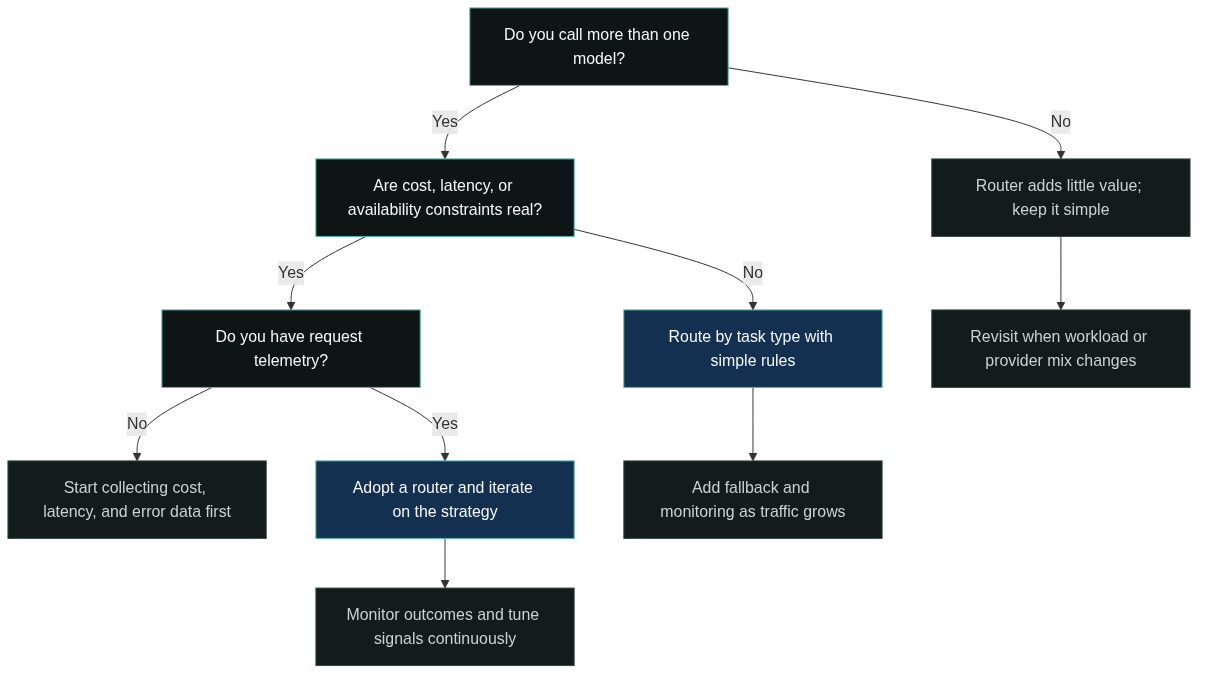
Use a router when the workload is diverse enough that no single model is a good default, when cost or latency targets are tight enough to justify per-request choices, or when provider availability is a production risk. Those conditions usually appear together once an application has real traffic and more than one model in consideration.
Skip a router when the application calls a single model, when traffic is low enough that model costs do not matter, or when a compliance or product constraint fixes the provider. A router also adds little when the team has no way to measure the outcome of routing decisions, because the strategy would be guesswork.
Ready to see routing in practice? Explore the models available through one OpenAI-compatible endpoint, read the docs to understand routing layers and pricing, or create an API key to start building.
FAQ
Is an LLM router the same as an API gateway?
No. A gateway manages authentication, rate limits, and endpoint routing, while an LLM router adds model selection based on request context. Many deployments combine them, but the routing decision logic is a separate concern.
Does an LLM router choose the best model automatically?
It chooses according to the strategy you configure. Rule-based and cost-aware strategies are deterministic; capability-based strategies may use a classifier. The router is only as good as the signals and rules you give it, so telemetry and tuning are part of the job.
Can an LLM router reduce costs?
Yes, in the common case where simple requests are routed to cheaper models. The saving depends on traffic mix and model pricing, so teams should measure per-request cost before and after, rather than assuming a fixed reduction.
What happens if the chosen model fails?
With fallback routing enabled, the router retries the request on an alternate model before failing. Without fallback, the request fails fast. Whether to enable retries depends on the request type and your latency budget.
Do I need a router if I use only one model?
No. A router earns its complexity only when you call multiple models or need per-request trade-offs. Start with one model and add routing when the workload or provider risk justifies it.
References
OpenAI. “Models overview.” https://platform.openai.com/docs/models. Public model catalog describing capability, speed, and usage differences across models.
Anthropic. “Models overview.” https://docs.anthropic.com/en/docs/about-claude/models/overview. Public documentation on selecting among Claude models by capability and cost.
LiteLLM. “Routing.” https://docs.litellm.ai/docs/routing. Public documentation on routing requests and fallback behavior across models.
OpenRouter. “Documentation.” https://openrouter.ai/docs. Public documentation of a managed LLM routing service and its model selection options.
Amazon Web Services. “Inference profiles for Amazon Bedrock.” https://docs.aws.amazon.com/bedrock/latest/userguide/inference-profiles.html. Public documentation describing routing to foundation models by region and workload.