

What to Evaluate in an LLM Router
Choosing the best LLM router is less about finding a winner and more about matching a tool to your constraints. Routers differ in which models they can reach, how flexible their routing rules are, how they surface cost, and how much work migration takes. A router that fits a small internal tool can be the wrong choice for a high-volume user-facing product, and the reverse is equally true.
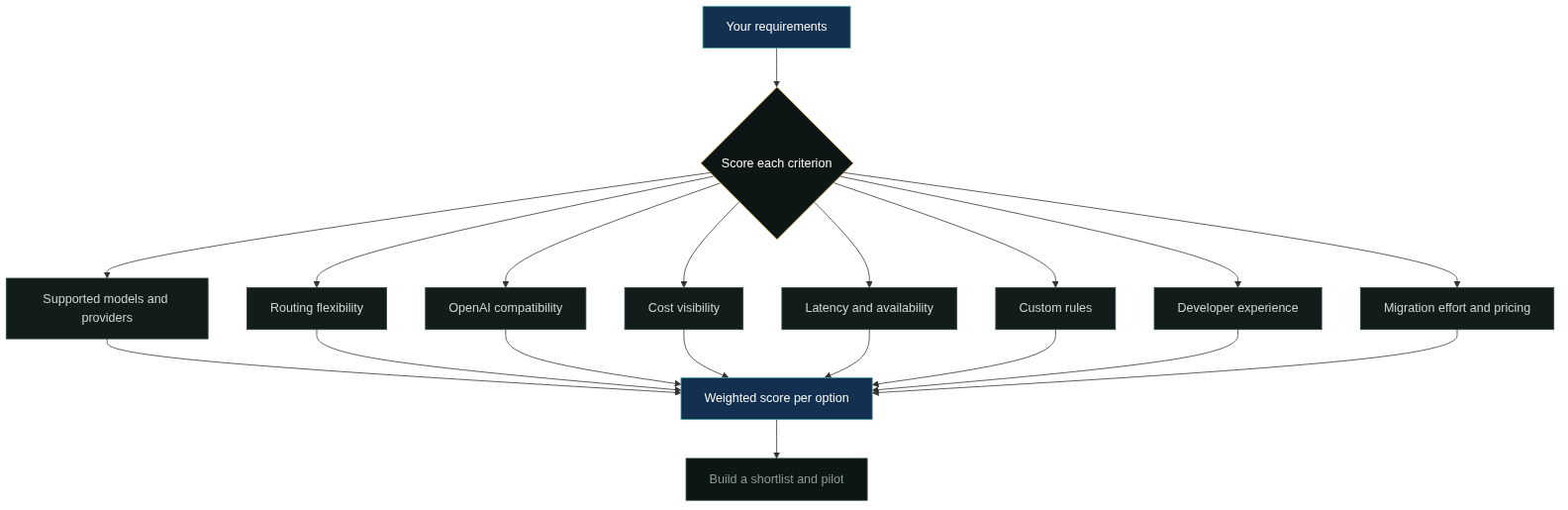
Eight criteria cover most of the decision: supported models and providers, routing flexibility, OpenAI compatibility, cost visibility, latency, availability, custom rules, and developer experience. Migration effort and pricing sit on top of those, because they decide how much the choice costs to make and to reverse. Not every criterion deserves equal weight. A team that already uses two specific models cares more about provider coverage than about routing features; a team moving from a prototype cares most about migration effort. The framework below shows how the criteria fit together.
Supported Models and Providers
The first question is whether the router can reach the models you actually need, both today and next quarter. Coverage has two dimensions: breadth, which is how many models and providers are available, and depth, which is whether the specific models your application depends on are supported with up-to-date capabilities.
Breadth matters when you expect to experiment. Depth matters more when you have a production dependency, because a router that lists a model but lags on its latest versions can silently pin you to an outdated capability. Check how new models are added, whether access is immediate or gated, and whether providers are reachable from your region. A router with a wide catalog is only useful if the models you need are actually callable from where you run.
Routing Flexibility
Routing flexibility is how much control you have over the routing decision. The minimum is a static mapping of request types to models. The useful range goes further: per-request signals such as cost, latency, and task type, custom rules, and fallback chains that keep requests alive when a model fails [3].
Evaluate flexibility against the routing strategies you plan to use. If your workload is simple, a router with a long feature list adds complexity without value. If you plan to combine cost and latency signals with policy rules, the router needs to support that pipeline, not just a fixed route. The balance is between expressiveness and operational burden: every capability you enable is something you must also monitor and debug.
OpenAI Compatibility
OpenAI compatibility means the router exposes an API shaped like the OpenAI chat completions endpoint, so existing OpenAI SDKs and code can point at the router by changing the base URL. This is often the cheapest migration path, because it avoids rewriting every call site.
Compatibility is not binary. Some routers match the core endpoint but differ on streaming, tool calling, response formats, or error shapes, and those differences surface exactly when an application depends on them. Test the compatibility against the features your code actually uses, not against a hello-world request. The OpenRouter documentation, for example, describes how its OpenAI-compatible endpoints behave for common integrations [4].
Cost Visibility
Cost visibility is the router’s ability to tell you what a request costs before and after routing. The minimum is per-model pricing you can look up. The useful level is per-request token and cost accounting, per-project or per-team breakdowns, and predictable billing across providers.
Without cost visibility, routing becomes a black box that can quietly increase spending. The questions to ask are practical: can you see cost per model, per project, and per time window? Can you set budgets or alerts? Are prices passed through from providers, or is there a markup? The answers decide whether the router helps you manage cost or only moves the billing problem elsewhere. Transparent pass-through pricing is one of the reasons managed routing services are compared on cost accounting rather than on model price alone [4][5].
Latency and Availability
Latency and availability determine what users experience. Evaluate both the router’s own overhead and the reliability of the providers behind it. Router overhead is usually small, but it adds to every request, so it matters for interactive traffic. Provider availability matters more: a router cannot make a failing provider healthy, though it can route around it.
Ask how the router handles provider outages and rate limits, whether it offers fallback behavior, and whether you can observe the health of the models you use. The reliability discussion overlaps with fallback design, which the LLM fallback guide covers in depth; for the selection decision, the question is whether the tool exposes the information you need to build that behavior.
Custom Rules
Custom rules are the router’s escape hatch for requirements that do not fit generic signals. The typical needs are data residency, provider allowlists and blocklists, per-team quotas, and request-type policies.
Evaluate how rules are expressed, whether they are versioned and auditable, and how they interact with other routing logic. Rules that live only in a chat panel are hard to review; rules stored as configuration you can version-control fit production workflows. Also check the failure semantics: when no rule matches and no signal applies, what is the default route? A clear default is as important as the rules themselves.
Developer Experience and Migration
Developer experience covers documentation, SDKs, debugging tools, and how quickly a new model call works in your environment. Migration effort is the cost of moving your existing traffic to the router.
The pragmatic test is to run one real request type through the candidate router: change the base URL or install the SDK, port the code paths that matter, and watch a few requests end to end. This surfaces integration friction that feature tables hide, such as auth setup, streaming quirks, or missing response fields. Plan the migration in stages, starting with a small share of traffic, because a router that handles a test request easily can still surprise you at production volume.
Pricing Models
Router pricing generally comes in three shapes: free or open-source tools you host yourself, usage-based managed services that charge per token or per request, and subscription tiers that bundle capacity and support. The shapes are not exclusive; some managed services add a usage fee on top of model costs.
Compare total cost, not the headline price. Total cost includes model spend, router fees, the engineering time to host and maintain a self-hosted tool, and the cost of switching later. For low traffic, a self-hosted tool can look cheapest until you count operations time. For high traffic, a managed service’s per-request fee can be justified by not running infrastructure yourself.
Putting It Together: a Shortlist
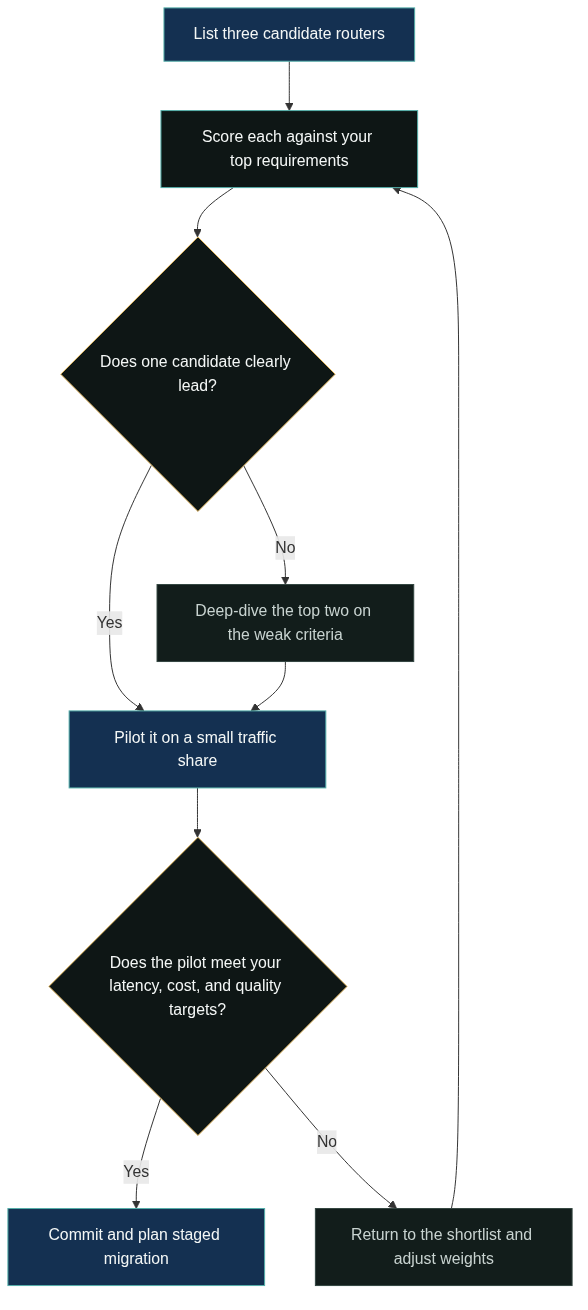
With the criteria in hand, the decision becomes a shortlist exercise. Write down your top three requirements, score each candidate against them, and run a pilot on real traffic before making a commitment.
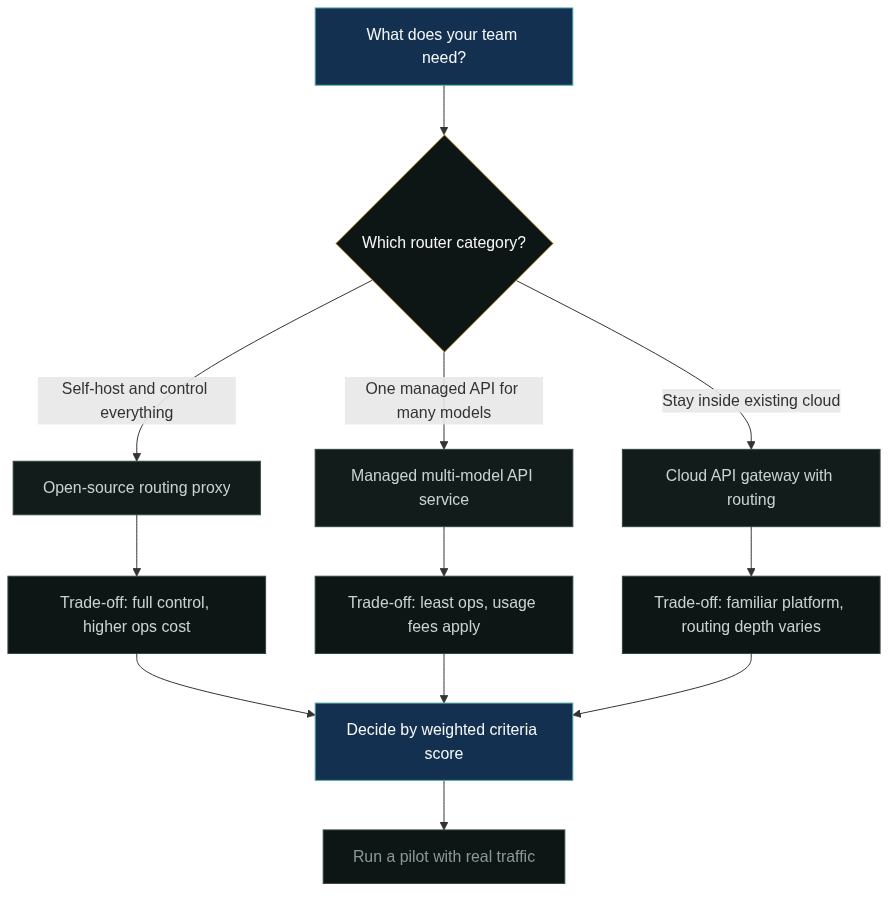
The category comparison matters more than individual brand names. An open-source routing proxy gives full control at the cost of operations work, and the open-source options are covered in the dedicated open source LLM routers guide. A managed multi-model API service such as GoModelHub provides one OpenAI-compatible endpoint across many models, with usage tracking and key management handled for you, which fits teams that want to minimize integration work. A cloud API gateway with routing fits teams that are already deep in one cloud platform. Each of these has strengths and weaknesses, and the right one depends on your engineering capacity, traffic volume, and tolerance for operational overhead.
Ready to compare options hands-on? Explore the GoModelHub model catalog and pricing, then create an API key to test one OpenAI-compatible endpoint against your own workload.
FAQ
What is the best LLM router?
There is no single best LLM router. The right choice depends on your requirements: which models you need, how much routing control you want, your traffic volume, and how much operations work your team can absorb.
What should I compare first when choosing a router?
Start with supported models and migration effort. If the router cannot reach the models your application depends on, or if moving your code is expensive, the other criteria matter less.
Are managed routing services better than open-source routers?
Neither is universally better. Managed services reduce operations work but add usage fees; open-source routers give more control but require hosting and maintenance. The open-source side is covered in the open source LLM routers guide.
How important is OpenAI compatibility?
Very important if you use OpenAI SDKs or code, because it can turn migration into a base-URL change. The catch is that compatibility varies on streaming, tool calls, and error shapes, so test the features your code actually uses.
How do I know a router will handle production traffic?
Run a pilot on a small share of real traffic before committing. Measure latency, cost per request, and error rates against your targets, and exercise the fallback path, because a router that looks good in tests can still fail at production volume.
References
OpenAI. “Models overview.” https://platform.openai.com/docs/models. Public model catalog describing capability, speed, and usage differences across models.
Anthropic. “Models overview.” https://docs.anthropic.com/en/docs/about-claude/models/overview. Public documentation on selecting among Claude models by capability and cost.
LiteLLM. “Routing.” https://docs.litellm.ai/docs/routing. Public documentation on routing requests and fallback behavior across models.
OpenRouter. “Documentation.” https://openrouter.ai/docs. Public documentation of a managed LLM routing service and its model selection options.
Amazon Web Services. “Inference profiles for Amazon Bedrock.” https://docs.aws.amazon.com/bedrock/latest/userguide/inference-profiles.html. Public documentation describing routing to foundation models by region and workload.