

What Is an AI Gateway?
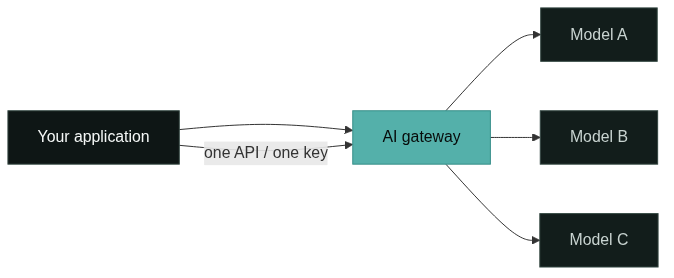
An AI gateway is an API layer that gives applications a single, consistent way to call AI models from multiple providers. You configure it once with the models you want to use, and your application talks to one base URL instead of many. The gateway manages the provider-specific details behind that URL: authentication, request formats, model selection, and response handling.
The name is used broadly. Some vendors call the same concept an LLM gateway, a model gateway, or a GenAI gateway, and the differences in naming often say more about the vendor’s focus than about the architecture. What matters for your team is the job it does: it is the control point between your product and the model providers you depend on.
AI Gateway vs. LLM Gateway: Same Pattern, Different Labels
An LLM gateway is the same class of software as an AI gateway, with the label emphasizing language model workloads. If your product only calls chat and completion models, an “LLM gateway” describes exactly what you run. As applications started combining text, reasoning, code, image, and embedding models, the industry shifted to “AI gateway” to cover a wider model catalog.
The relationship matters for procurement, not for architecture. When a vendor markets an LLM gateway, check that it covers the model types you plan to use, not just chat models. When a vendor markets an AI gateway, check that the provider integrations you actually need are on the list. The pattern underneath is the same, and your evaluation should compare concrete capabilities.
Why Multi-Model Applications Need a Gateway Layer
The need appears when your application depends on more than one model or provider. Without a gateway, every new model means a new SDK, a new set of credentials, and a new request format to handle in your code. Model switching becomes a small rewrite, and usage and cost data stay scattered across provider consoles.
A gateway changes that equation. The application keeps one integration, and the model list becomes a configuration concern. When a task fits a cheaper or faster model, you point the request at that model without changing the application. When a provider changes its API, the gateway absorbs the change. The benefit compounds as the number of models grows, which is why teams usually adopt a gateway when they start mixing general, coding, and reasoning models in one product.
Unified Model Access: One API for Many Models
Unified access is the core capability. Through the gateway, different models appear behind one OpenAI-compatible interface, so an application that already speaks one request format can call any model on the platform. You set the base URL, send your API key, and reference the model by name.
This is also where the GoModelHub platform fits: one API to access, switch, and manage AI models, with a model catalog that shows context length, token pricing, capabilities, and supported interfaces. For a team that wants to compare models before committing, that central catalog removes most of the integration work that used to live in the application code.
Authentication and API Key Management
A gateway centralizes credentials. Instead of maintaining separate accounts and keys per provider, your team manages API keys in one place, scoped by project and environment. Development and production can use different keys, and a key can be revoked without touching the application.
Central key management matters more than it looks at first. When an application integrates five providers directly, rotating a leaked key means updating five places and hoping nothing was missed. With a gateway, you rotate one key, and you can see which project and environment used it. The same principle applies to access control: teams get one place to decide who can call which models.
Routing Basics: Directing Requests to the Right Model
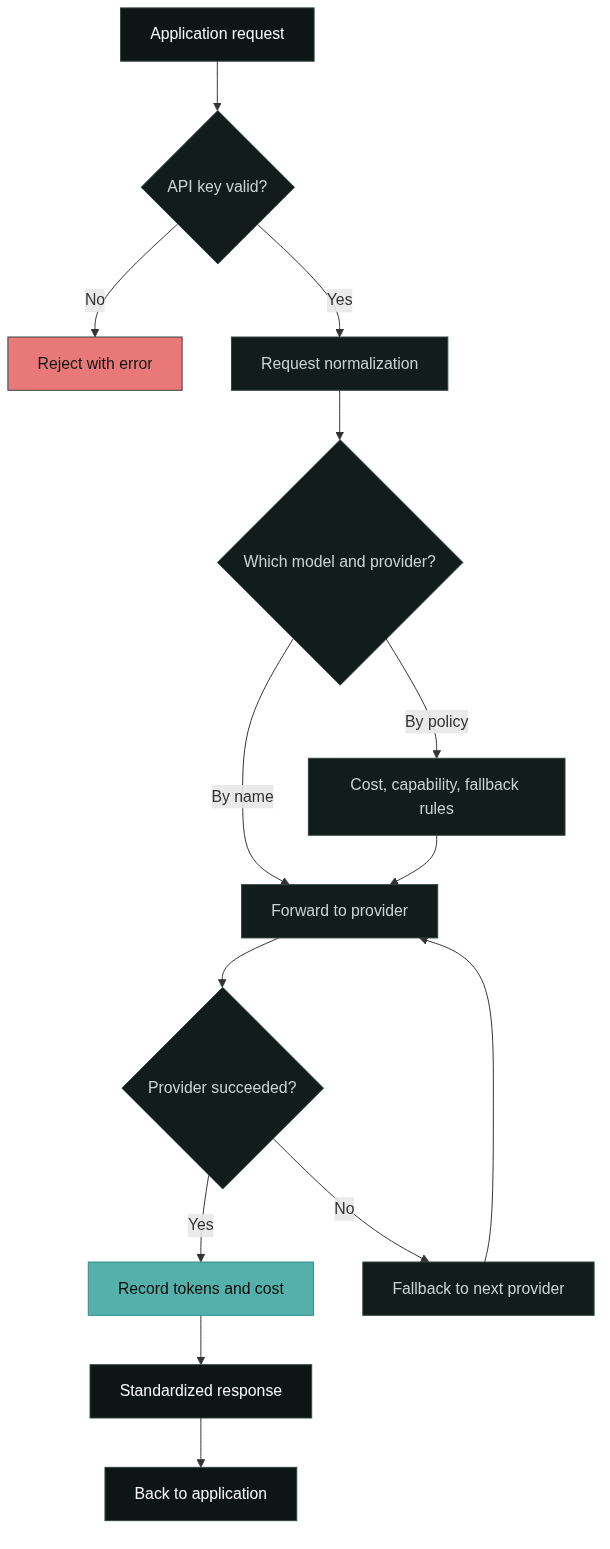
Routing is the gateway feature that decides where each request goes. The simplest form is name-based routing: your code asks for a specific model and the gateway forwards the request to the right provider. More advanced routing can pick a model by cost, capability, or fallback rules when a provider fails.
For most teams, routing starts simple and grows with the product. A gateway lets you start with explicit model names and add policies later, without changing your application. The deeper mechanics of model selection belong in the AI gateway architecture guide, which walks through the request path component by component.
Usage and Cost Visibility
Every request that passes through a gateway can be metered. You see token counts, request volumes, and cost per model, per project, and per time period in one place. That visibility turns “how much are we spending on AI?” from a spreadsheet exercise into a dashboard question.
The practical payoff is catching problems early. A runaway loop that calls a large model thousands of times shows up as a cost spike instead of a surprise bill at the end of the month. Usage data also feeds cost-tiered design: routine tasks can use a high-value model while complex tasks use a stronger one, and the gateway records the difference.
Reliability, Policy, and Observability
A gateway layer gives you a place to enforce the operational controls that production AI features need. Retries, fallbacks, timeouts, and rate limits can live here, so a provider outage degrades gracefully instead of failing the whole feature. Observability data, including standardized error messages, helps you find the failing model quickly.
The same position makes the gateway the natural home for policy. Teams can set per-project token limits, cap budgets, and enforce which models are allowed where. These controls are hard to build consistently inside each application, and they are exactly what a platform team wants to own centrally.
Common Use Cases for an AI Gateway
The clearest use cases are products and internal tools that already use several models. AI product teams building chat, content, or code features use a gateway to mix general and specialized models without duplicating integration code. Agent builders use it to keep orchestration code simple while calls fan out to different models for different steps. Enterprise teams use it to give internal assistants a governed, metered path to models. And teams doing cost-tiered calling use it to send routine work to cheaper models and complex work to stronger ones.
A gateway is also the path to model flexibility. When the model catalog grows, the application does not need to know. That makes the gateway a natural fit for products that expect to evolve their model mix over time.
When Do You Need an AI Gateway?
You probably do not need one on day one. A prototype calling a single provider through its SDK is fine without a gateway, and adding one too early adds configuration without much benefit. The threshold appears when you can answer “yes” to a few questions: are you calling more than one model or provider, do you manage more than a couple of API keys, do you need per-project cost visibility, or do you want to switch models without code changes?
The decision is also a prediction. Teams that expect to expand their model usage adopt a gateway before the pain gets loud, because retrofitting a control layer across many direct integrations is more work than starting with one. For a team that is already past the prototype stage, the question is less “do we need a gateway” and more “which gateway capabilities matter first.”
Router vs. Proxy vs. API Gateway vs. AI Gateway
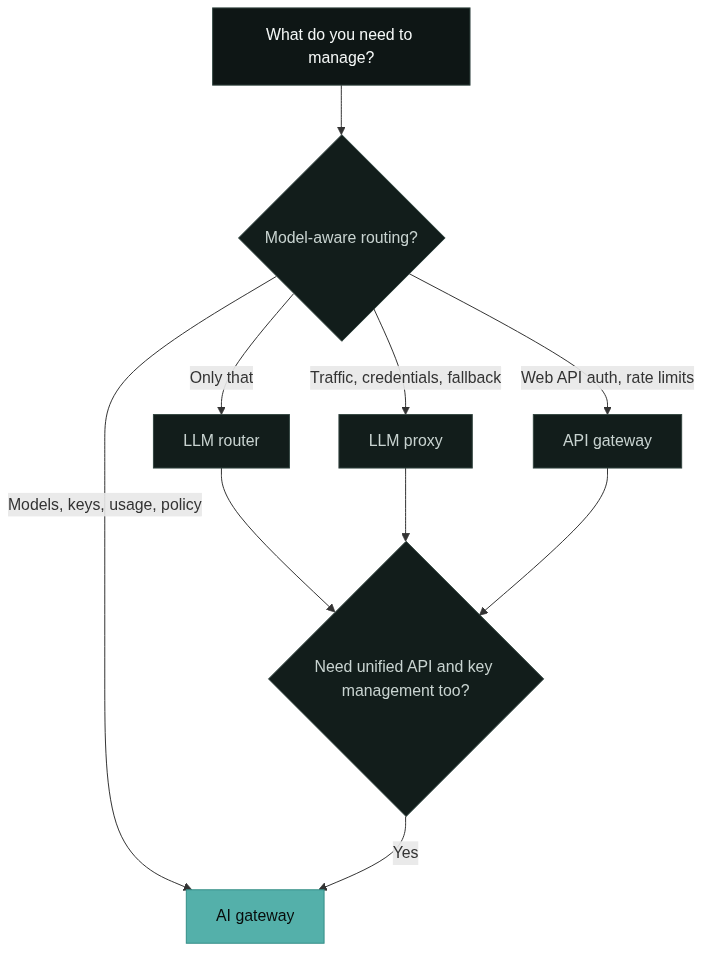
These four terms overlap, and the practical distinction is scope. An LLM router focuses on the decision layer: which model handles which request, based on cost, capability, or fallback logic. An LLM proxy forwards API traffic, handles credentials, and can add fallbacks, but it typically does less around policy and management. A traditional API gateway handles web API concerns like authentication, rate limiting, and observability, but it is not model-aware and does not think in tokens or model fallbacks.
An AI gateway is the broadest of the four because it combines unified access, key management, routing, usage visibility, and reliability controls in one layer. That is why it is often described as a router, proxy, and API gateway for AI workloads in a single component. If the terminology debate is eating your time, the practical test is what your team needs to manage: if the answer is models, keys, and costs, an AI gateway is the layer you are describing.
Summary
An AI gateway gives your application one API for many models and gives your team one place to manage access, keys, routing, usage, and reliability. It overlaps with LLM gateways, routers, proxies, and API gateways, but it is broader than each of them because it covers the full set of controls an AI product needs. Start with the capabilities you actually use, adopt it when multiple models or providers become part of the product, and keep the model list in the gateway so your application stays simple.
For the terminology differences, continue with AI gateway vs API gateway: what’s the difference. When you want to compare products, the best AI gateways in 2026 guide gives you a selection framework. And if the model access layer is what you are building, the open-source AI gateway options article covers self-hosting trade-offs.
FAQ
What is an AI gateway in simple terms?
An AI gateway is a single API layer between your application and the AI models it calls. It handles model access, API keys, routing, usage tracking, and reliability controls, so the application only needs one integration instead of one per provider.
Is an AI gateway the same as an LLM gateway?
Yes, in architecture. An LLM gateway emphasizes language model workloads, while an AI gateway covers a wider model catalog. The pattern is the same, and the label mostly reflects the vendor’s focus.
Do I need an AI gateway?
You need one when you call more than one model or provider, manage several API keys, need per-project cost visibility, or want to switch models without rewriting the application. A single-provider prototype can usually skip it.
What is the difference between a router and an AI gateway?
A router decides which model handles a request. An AI gateway includes routing but also handles unified API access, key management, usage visibility, and reliability controls. The router is one capability inside the broader gateway pattern.
How does an AI gateway help with cost control?
It meters every request by model, token, and project, so you can see spending in one place, catch abnormal spikes early, and route routine tasks to more cost-effective models.
References
Google Cloud, “AI Gateway,” cloud.google.com. Official product documentation describing an AI gateway as a managed layer for accessing multiple generative AI models through a unified API.
Microsoft Azure, “What is Azure API Management?,” learn.microsoft.com. Official documentation explaining API gateway concerns such as authentication, rate limiting, and observability for web APIs.
Kong, “What is an AI Gateway?,” konghq.com. Vendor documentation describing the AI gateway as a layer that combines routing, access control, and observability for AI workloads.
Nginx, “What is an API Gateway?,” nginx.com. Public technical explanation of the traditional API gateway pattern and its responsibilities.
Portkey, “AI Gateway Documentation,” portkey.ai. Public documentation describing LLM gateway features such as unified API access, routing, fallbacks, and usage tracking.
Next Steps
Start by writing down the models your product actually calls today and the controls you are missing: key management, routing, cost visibility, or fallbacks. Then evaluate a gateway against that list rather than against marketing terms. GoModelHub is a good reference point for the unified model access part, and you can explore the platform to see how the model catalog, API keys, and usage views fit your workflow.
Ready to look closer? Browse the models catalog or read the documentation to see how one API connects to the models you need.