

Where an AI Gateway Sits in the Request Path
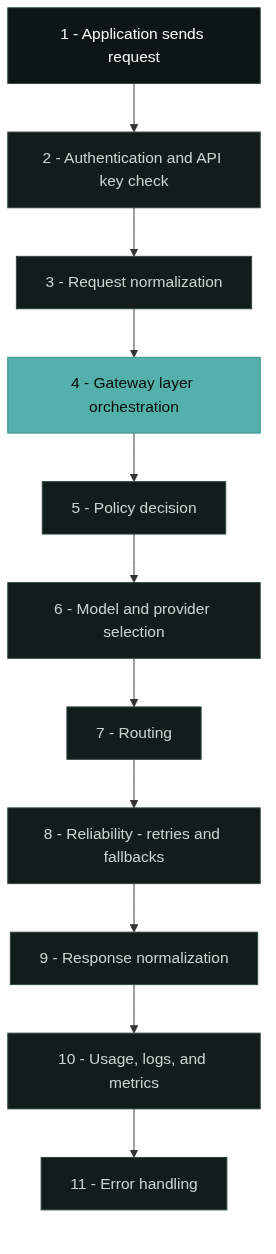
An AI gateway sits between your application and the model providers, and the ai gateway architecture is best understood as a request lifecycle rather than a static list of features. Every call passes through the same sequence: the application sends a request, the gateway authenticates it, normalizes it, applies policy, selects a model, routes the call, handles failures, normalizes the response, and records what happened [1][2][3][4][5].
The gateway occupies the layer between the application and the providers. Your application talks to one endpoint, and the gateway talks to many providers: OpenAI, Anthropic, Google, and open-weight models served by other vendors [1][4]. That position gives the team one place to manage keys, policy, routing, and cost instead of duplicating that logic in every service.
Three properties of ai gateway architecture follow from this position. First, the application never sees provider credentials or provider-specific formats, because the gateway absorbs both. Second, the gateway can change which provider answers a request without the application changing, because the model name is resolved inside the gateway. Third, every call produces telemetry at one choke point, which is what makes usage and cost reporting practical.

Step 1: The Application Sends a Request
The lifecycle starts in the application. The client uses the gateway’s base URL instead of a provider’s, sends a model identifier, and includes its own gateway API key. For OpenAI-compatible gateways, the request looks like a standard chat completion call with a different endpoint and key [6][7].
Two decisions happen here that the gateway later uses. The application either names a specific model explicitly, or it sends a logical request with a task type and lets the gateway choose. It also decides whether the call is streaming or non-streaming, which affects how the gateway normalizes the response later. Nothing in this step is provider-specific; the application remains portable.
Step 2: Authentication and API Key Checks
The first thing the gateway does with the request is verify that it is allowed to enter. It validates the caller’s API key, checks which project or environment the key belongs to, and rejects requests without valid credentials. Gateway vendors implement this with virtual keys that wrap the real provider keys, so the application never holds a provider credential [2].
Authentication also establishes the identity that policy and usage tracking will use. The key binds the request to a project, a budget, and a set of permissions, so later steps know whose tokens are being spent and which models that identity is allowed to call. Key management is a core gateway component rather than an add-on, because it is the anchor for every subsequent decision.
Step 3: Request Normalization
Once authenticated, the request is normalized into the gateway’s internal representation. Most gateways use the OpenAI chat completion contract as the common shape, then translate from other formats on the way in [6][7]. A request that arrived in a provider-specific format becomes the standard schema before any policy or routing logic runs.
Normalization is what makes the unified API real. Your application sends one format, and the gateway adapts it per provider on the way out. The same normalization applies to parameters such as temperature, max tokens, and tool definitions, which different providers spell differently. If you have read what is an AI gateway and wondered how one API can cover many providers, this step is the mechanical answer.
Step 4: The Gateway Layer
The gateway layer is the orchestration core that runs the remaining steps in order. It holds the request, the authenticated identity, and the normalized payload, and it coordinates policy, model selection, routing, reliability, and response handling as one pipeline [5]. In implementation terms this is the proxy or server component of the gateway, such as the LiteLLM proxy server or Portkey’s AI gateway service [2][3].
This layer is also where extensibility in ai gateway architecture lives. Vendors describe the AI gateway as a layer that combines routing, access control, and observability for AI workloads, and the exact mix of steps is configurable per deployment [5]. The steps are separable: you can add a policy check, swap a router, or change a fallback strategy without rewriting the rest of the pipeline.
Step 5: Policy Decision
Before the request is routed, the gateway applies policy. Typical policies include budget checks, per-project spend limits, model allowlists, rate limits, and content guardrails [2]. A request that would exceed a project budget, or that names a model outside the team’s allowlist, is rejected here with a policy error.
Policy is evaluated against the authenticated identity from step 2, which is why the two steps are connected. The same request shape can be allowed for one project and blocked for another, because the decision is a function of identity plus payload plus current usage. Teams that treat gateway policy as a governance surface get per-team control without changing application code.
Step 6: Model and Provider Selection
If the application did not name a model explicitly, the gateway selects one. Selection is driven by the policy and routing configuration: task type, cost targets, capability requirements, latency constraints, and the models currently available. Gateways document this as conditional routing, where rules such as “use the cheaper model for this request type” are evaluated against the normalized payload [3].
Even when the application names a model, the gateway usually resolves it to a concrete provider and deployment. A single model name can map to several upstream endpoints, and the gateway picks the one that fits the current configuration. This resolution step keeps the application stable when providers add or remove deployments.
Step 7: Routing
Routing sends the selected request to the chosen provider. In an AI gateway, routing is model-aware: the decision considers model availability, provider health, and configured weights, rather than just a URL path [2][3][5]. Open-source gateways expose load balancing across deployments of the same model, and managed gateways add conditional rules on top [2][3].
Routing also handles provider-specific details that the rest of the pipeline should not care about. Each provider gets the request in its own format, with the right credentials attached and the right timeout applied. If the response is streaming, the routing layer keeps the connection open and forwards chunks back through the pipeline.
Step 8: The Reliability Layer
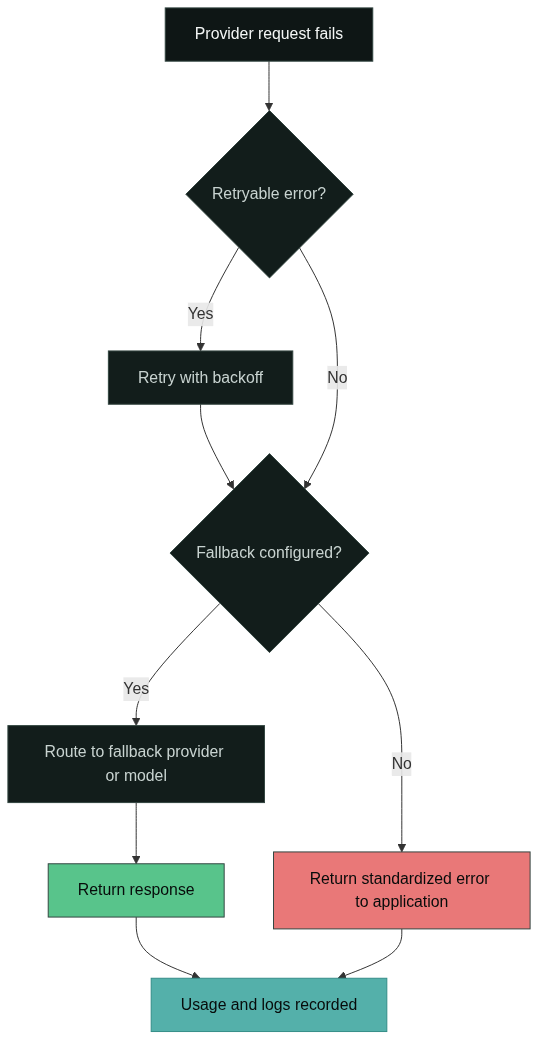
The reliability layer decides what happens when a provider call fails or is slow. Standard mechanisms are retries with backoff, automatic fallbacks to another provider or model, and response caching for repeated requests [4][5]. Cloudflare’s AI Gateway, for example, documents retries, model fallbacks, and caching as core features of the layer [4].
The reliability layer is where the gateway earns its keep in production. A provider outage becomes a fallback event instead of a user-facing error, because the gateway can shift the request to a healthy provider before responding. The trade-off is latency and cost: retries and fallbacks add time and may use a more expensive model, so teams configure which failures are worth absorbing and which should fail fast.
Step 9: Response Normalization
When the provider responds, the gateway normalizes the response back into the shared contract. Provider-specific response shapes become the standard schema again, including choices, token usage fields, and tool call payloads [6][7]. For streaming, chunks are translated as they arrive, so the application receives one consistent stream regardless of the upstream provider.
This step closes the loop that normalization opened in step 3. The application sent a standard request and receives a standard response, while the provider-specific work stays inside the gateway. Response normalization also strips or rewrites provider-specific error payloads, which connects directly to error handling later in the lifecycle.
Step 10: Usage, Logs, and Metrics
Every request is metered at the gateway. The usage pipeline records the model that answered, input and output token counts, latency, cost, and the project the request belonged to [2][4]. This data feeds dashboards, budgets, and cost attribution, which is why gateways are described as the place where token usage becomes visible [1].
Metering is not passive logging. Spend tracking and budgets consume the same counters, so a project that exceeds its allowance can be limited automatically in the policy step of the next request [2]. The usage pipeline turns raw request traffic into the cost and capacity data that finance and platform teams can act on.
Step 11: Error Handling
Finally, the gateway translates failures into a consistent error contract. Provider outages, rate limits, policy rejections, and malformed requests become standardized errors with stable status codes and message shapes, instead of leaking provider-specific payloads to the application [6]. The reliability layer decides whether a failure is retried or falls back; error handling decides what the application ultimately sees.
Error handling is also where observability pays off. Logs from steps 10 and 11 tell you whether a spike of errors is one provider failing, a policy blocking traffic, or a bug in your own request shape. The architecture keeps these signals in one place so that the question “what failed and why” can be answered from the gateway rather than from provider consoles. The decision flow below shows the failure path.
Where Each Layer’s Responsibility Ends
The boundary between layers is what makes an ai gateway architecture testable. The application owns the request shape, the business logic, and what the user sees. The gateway owns provider access, policy, routing, reliability, and telemetry. The provider owns model inference, capacity, and its own API behavior. The table below summarizes the boundary for each area in the ai gateway architecture.
| Area | Application | AI gateway | Provider |
|---|---|---|---|
| Request shape | Sends OpenAI-compatible call | Normalizes to shared contract | Receives provider format |
| Credentials | Holds one gateway key | Holds and rotates provider keys | Issues provider keys |
| Model choice | Names model or task type | Selects and resolves model | Serves the model |
| Policy | None by default | Budgets, allowlists, guardrails | Rate limits |
| Failure handling | Handles final error | Retries and falls back | Reports errors |
| Usage data | Reads dashboards | Meters tokens and cost | Bills the gateway |
Two consequences follow. If a capability belongs in the gateway column, your application should not reimplement it, because you would duplicate logic that already runs in one place. If a capability belongs in the provider column, the gateway cannot guarantee it, because it only relays what the provider exposes. Teams that draw this line early avoid the two classic mistakes: embedding provider logic in the application, or expecting the gateway to fix a provider’s behavior.
The deployment decision is the last boundary. The responsibilities in the table are the same whether the gateway is managed or self-hosted, but who operates the infrastructure differs. The open-source AI gateway guide covers that ownership trade-off in detail, including what self-hosting actually costs a team.
FAQ
What is the difference between an AI gateway and a proxy in an architecture?
A proxy is a forwarding layer; in ai gateway architecture, the gateway is a policy and routing layer with proxy behavior. In the request lifecycle above, a thin proxy would cover steps 1, 3, and 9 only, while a gateway also performs authentication, policy, model selection, routing, reliability, and metering. The what is an AI gateway guide explains the terminology boundary.
Where do tokens get counted in the architecture?
Token counting happens in the usage pipeline at step 10, using the usage fields the provider returns with the response. The gateway attributes those counts to the authenticated project from step 2, which is what makes per-project cost reporting possible [2][4].
Can I build this architecture myself?
Yes, and teams do. Open-source gateways such as LiteLLM provide the proxy server, virtual keys, spend tracking, and load balancing described in the lifecycle, so the architecture is reproducible rather than proprietary [2]. The effort is in operating it: updates, monitoring, scaling, and provider API changes become your responsibility, which is the trade-off covered in the open-source AI gateway guide.
References
Google Cloud, “AI Gateway.” cloud.google.com. Official product page describing AI Gateway as a managed layer for accessing multiple generative AI models through a unified API.
BerriAI, “LiteLLM Documentation.” docs.litellm.ai. Official documentation covering the proxy server, virtual keys, spend tracking, budgets, guardrails, and load balancing used in the request lifecycle.
Portkey, “AI Gateway.” portkey.ai. Public documentation covering the unified API, conditional routing, fallbacks, and observability of an AI gateway.
Cloudflare, “AI Gateway.” developers.cloudflare.com. Official product documentation covering logging, caching, rate limiting, retries, model fallbacks, and analytics.
Kong, “How AI Proxies Cut Development Costs.” konghq.com. Kong engineering blog describing the AI gateway as a layer combining routing, access control, and observability for AI workloads.
OpenAI, “API Reference.” platform.openai.com. Official API reference defining the chat completion request and response contract used as the common gateway format.
OpenRouter, “Frequently Asked Questions.” openrouter.ai. Official FAQ describing how an OpenAI-compatible API acts as a drop-in format across many providers.
Next Steps
Trace one real request through this ai gateway architecture before you change anything. Write down which model your application names, who owns the key, what happens when the provider is slow, and where usage data currently lands. That trace tells you which gateway component your stack is missing.
If the terminology is still unclear, start with what is an AI gateway before reading deeper architecture material. When you are ready to evaluate an implementation, read the GoModelHub documentation to see how a unified, OpenAI-compatible API with key management and per-project usage tracking fits the lifecycle above, and browse the models catalog to check coverage for the providers you use.