

What Is an Open-Source LLM Router?
An open source LLM router is a routing component whose source code you can inspect, modify, and deploy on infrastructure you control. Instead of calling a managed routing service, you run the router yourself, point it at the model providers of your choice, and own its configuration, updates, and monitoring. For many teams this is the most flexible option; for others it is a maintenance burden that outweighs the benefits.
The core capability is the same as any router: it receives requests, applies routing logic, and forwards them to a selected model. What changes is ownership. You control where it runs, how it is configured, and what happens to the data that flows through it. Open source does not mean free to operate: the license covers the software, not the infrastructure, the engineering time, or the provider costs. This article assumes you understand router basics and the general vendor landscape; the guide to the LLM router covers the foundation, and the comparison of best LLM routers covers provider-level evaluation criteria.
Why Teams Self-Host a Router
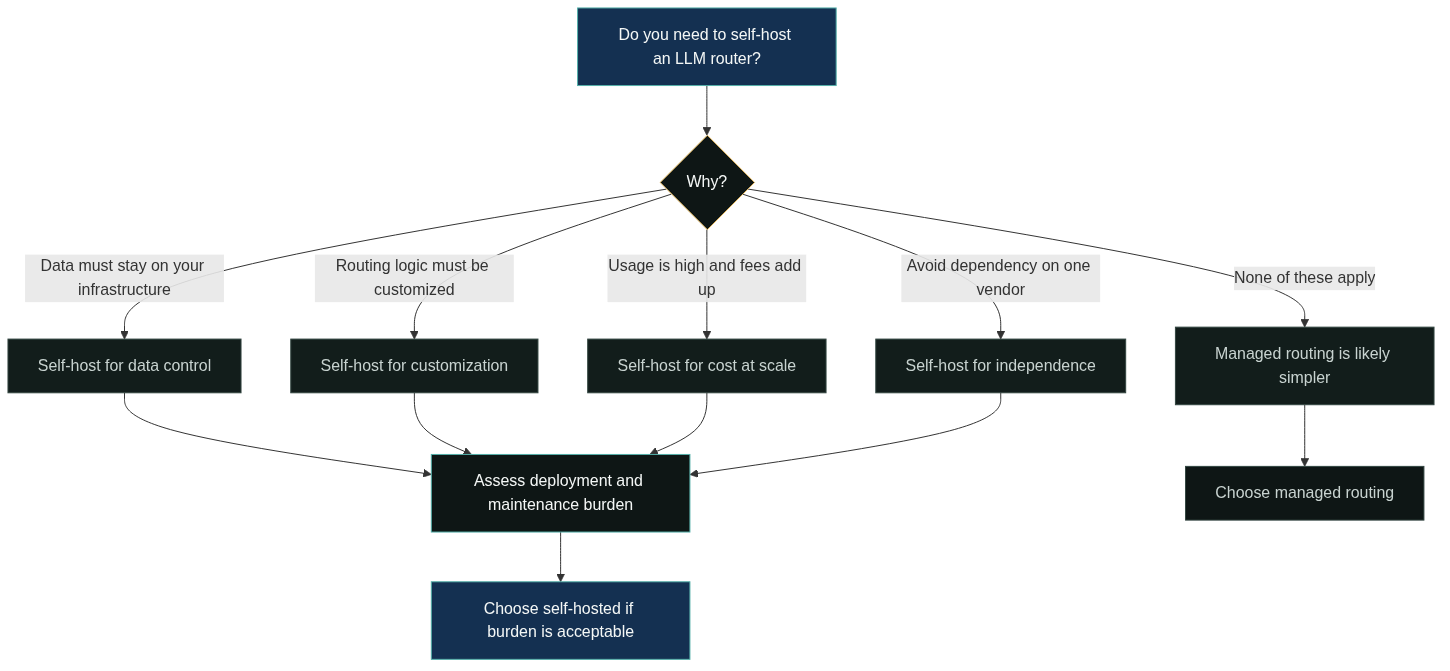
The reasons to self-host fall into a few recurring patterns. Data control is the most common: the router sees every request and response, and some teams cannot send that traffic through a third-party routing service. Customization comes next, because a team with unusual routing logic can modify the code instead of fitting their needs into a vendor’s feature set. Cost is a third driver for high-volume workloads, where a per-request fee on a managed service can exceed the cost of running your own instance. Vendor independence is the fourth: self-hosting removes a dependency on a specific routing provider.
These reasons are strongest in combination. A team that needs data control, custom logic, and high volume has a compelling case. A team that needs none of them may be paying for complexity it never uses.
Common Project Types
Open source routing tools cluster into a few project types, and the type shapes the trade-offs you inherit. The examples below describe categories, not a ranking of specific projects.
Proxy and gateway projects are the largest category. They run as a standalone service that sits between your application and model providers, expose an OpenAI-compatible endpoint, and handle routing, fallback, and usage tracking [3]. These are closest to a managed routing service in shape, minus the hosting.
Library-style projects embed routing logic inside your application code. They give fine-grained control and avoid running a separate service, but they couple routing to your application lifecycle and are harder to share across teams.
Platform-extension projects plug into an existing gateway or service mesh. They fit teams already invested in one platform, at the cost of being constrained by that platform’s routing depth.
Routing Methods in Open-Source Tools
The routing methods available in open source tools mirror the strategies you would use anywhere: rule-based mapping, cost or latency scoring, task-based classification, and fallback chains [3]. The difference is that you implement or configure them yourself, which gives you full control and full responsibility.
The practical question is how much routing logic you actually need. A simple rules file may be enough for a small workload. Scoring multiple signals, health checks, and fallback behavior require more implementation and testing. The LiteLLM routing documentation, as one example, shows how request routing and fallback can be expressed in configuration rather than code [3]. The effort scales with ambition, and teams underestimate the testing burden of custom routing logic at their own risk.
Deployment and Infrastructure
Deployment is where self-hosting becomes concrete. You choose where the router runs, how it scales, and what it depends on.
The router typically runs as a container or service in your existing infrastructure, alongside your application. It needs network access to the model providers you use, and it needs the API keys for those providers, which makes secret management part of the deployment. Scaling is usually straightforward for routing because the component is stateless, but the surrounding pieces, such as logging, metrics, and configuration delivery, must be provisioned like any production service.
Maintenance and Provider Updates
Maintenance is the recurring cost that teams most often underestimate. An open source router is software you now own: you apply updates, fix issues, and track its release cadence.
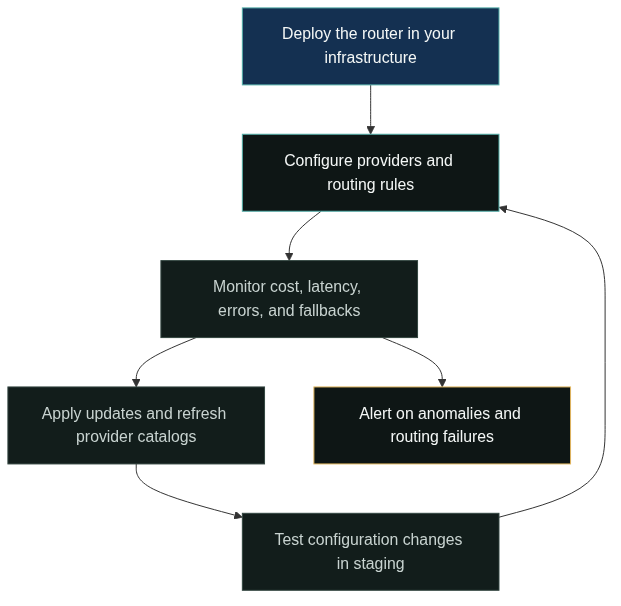
Provider updates deserve special attention. Model providers change pricing, add models, deprecate endpoints, and adjust rate limits, and a self-hosted router only knows about those changes when you update its provider catalog and routing configuration. A managed routing service absorbs that work on your behalf; self-hosting puts it on your team. The practical mitigation is a regular maintenance routine and a way to test configuration changes before they reach production.
Monitoring and Observability
A self-hosted router is only as trustworthy as its observability. You need to know which model served each request, why the router chose it, how long the request took, what it cost, and whether fallbacks fired.
Without this telemetry, routing decisions are invisible and tuning is guesswork. Plan for structured logs and metrics from day one, and connect the router to your existing monitoring and alerting stack. A managed service provides much of this out of the box; a self-hosted deployment requires you to build or configure it.
Security and Control
Security is a core reason to self-host, but it comes with obligations. The router holds the API keys for every provider you use, so key storage and access control become critical. It also sees request and response content, which means data handling, retention, and access logging are your responsibility.
The control argument cuts both ways. Self-hosting lets you keep data on your infrastructure, but you are then responsible for patching, access review, and incident response for that infrastructure. Teams that lack dedicated security or platform engineering should weigh this carefully against a managed alternative.
Cost: Open Source vs Hosted
The cost comparison is rarely as simple as license-free versus per-request fees. Self-hosting has infrastructure costs, engineering time for setup and maintenance, and the hidden cost of keeping provider integrations current. Managed routing has subscription or usage fees but shifts that work to the vendor.
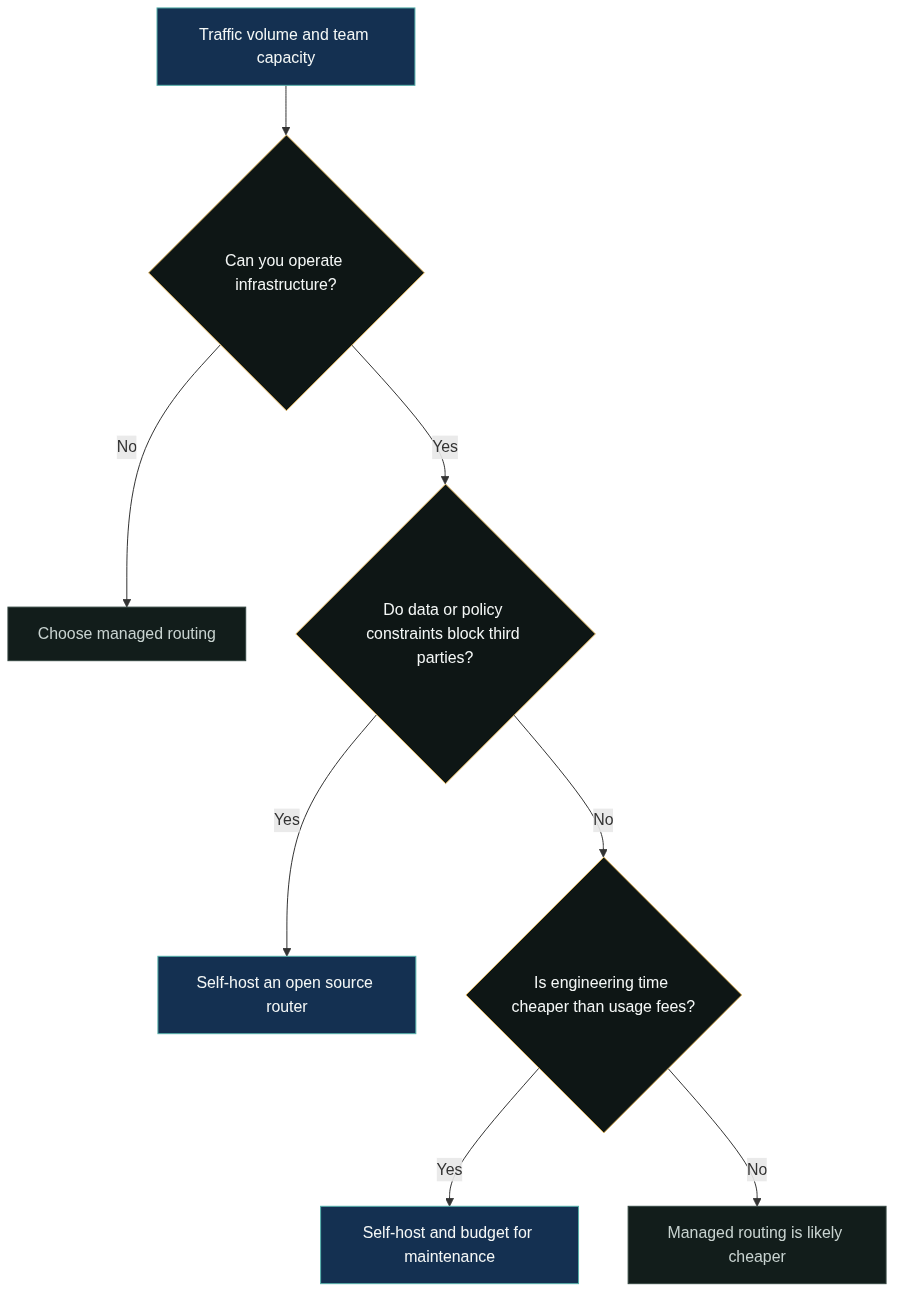
The crossover point depends on your volume and team. Low traffic with spare engineering capacity favors self-hosting on paper, until maintenance time is counted. High traffic with limited engineering capacity can make managed routing cheaper even with fees, because it removes an entire class of operational work. The honest approach is to estimate total cost over a year, including engineering hours, and revisit the estimate as traffic grows.
Open Source vs Managed: When to Choose
There is no universally correct side, but the fit is predictable by team profile. Teams with platform engineering capacity, data-control requirements, and custom routing needs are the natural audience for an open source router. Teams that want to move fast, have limited operations capacity, or prefer a single vendor to handle provider integrations usually fit managed routing better.
A hybrid path exists and is common: prototype with a managed service, then self-host when the workload and requirements justify the operations cost, or run an open source router for controlled environments and a managed service for the rest. The provider-level evaluation criteria, such as model coverage, cost visibility, and migration effort, still apply, and the best LLM routers guide walks through them. GoModelHub is one managed option that provides a single OpenAI-compatible endpoint across models, for teams that prefer not to operate routing infrastructure themselves.
Evaluating routing options? Explore the GoModelHub model catalog and pricing, then create an API key to test one OpenAI-compatible endpoint against your own workload.
FAQ
What is an open source LLM router?
It is a routing component whose source code you can inspect, modify, and deploy yourself. It performs the same model selection and fallback work as any router, but you own its infrastructure, configuration, and maintenance.
Why would a team self-host a router?
The common reasons are data control, custom routing logic, cost at high volume, and independence from a routing vendor. These reasons matter most in combination, and each one adds operations work in exchange.
Are open source routers free?
The software is free under its license, but operation is not. You pay for infrastructure, engineering time, maintenance, and provider costs, so the total cost depends on your volume and team.
Is self-hosting more secure than managed routing?
It can be, because data stays on your infrastructure and you control access. The trade-off is that you are responsible for key storage, patching, and incident response, so security depends on your own practices.
Which teams should choose open source over managed?
Teams with platform engineering capacity, data constraints, or custom routing needs. Teams with limited operations capacity or a preference for a vendor to handle provider integrations usually fit managed routing better.
References
OpenAI. “Models overview.” https://platform.openai.com/docs/models. Public model catalog describing capability, speed, and usage differences across models.
Anthropic. “Models overview.” https://docs.anthropic.com/en/docs/about-claude/models/overview. Public documentation on selecting among Claude models by capability and cost.
LiteLLM. “Routing.” https://docs.litellm.ai/docs/routing. Public documentation on routing requests and fallback behavior across models.
OpenRouter. “Documentation.” https://openrouter.ai/docs. Public documentation of a managed LLM routing service and its model selection options.
Amazon Web Services. “Inference profiles for Amazon Bedrock.” https://docs.aws.amazon.com/bedrock/latest/userguide/inference-profiles.html. Public documentation describing routing to foundation models by region and workload.