

LLM Selection: How to Choose the Right AI Model
Your project does not need the “strongest” model. It needs the most suitable one. That single shift in mindset is the foundation of a repeatable llm selection process, and it saves teams from the most common failure pattern in AI product development today.
Here is the scenario that plays out far too often. A team reads a leaderboard, picks the model at the top, spends weeks integrating it, and then discovers under real load that first-token latency blows past the product’s tolerance, the token bill scales out of control, or the model underperforms on the very task the product was built around. Meanwhile, a cheaper, faster model handles that specific workload better.
As GPT, Claude, Gemini, and DeepSeek converge in raw capability, the differences that actually separate them are task fit, cost, latency, integration, and reliability — not headline benchmark scores. This guide gives you a reusable llm selection framework: a decision table, a fill-in checklist, and a step-by-step flow you can apply to any project, today and again in six months when models and prices change.
Why “The Strongest Model” Is the Wrong Starting Point
The all-too-common trap: integrating a leaderboard-topping model and hitting real-world constraints
Public leaderboards rank models on generic, public tasks. They do not model your traffic, your prompt shapes, your latency budget, or your cost ceiling. A repeatable llm selection process avoids this failure: when a team commits to a top-ranked model before defining those constraints, the integration often fails not because the model is weak, but because it was never the right fit for the production context.
The fix is not to avoid capable models. It is to decide what your application actually needs first, then evaluate candidates against those requirements.
When capability converges, the differentiators are engineering and business dimensions
Frontier models now sit close together on broad capability. That makes the decision harder in a useful way: when raw quality is roughly comparable, cost per token, latency, context handling, API compatibility, and reliability become the deciding factors. A model that is 2 percent better on a coding benchmark but 10 times more expensive at your call volume is rarely the right production choice.
What this guide promises — and what it deliberately does not
This article does not rank “the best LLM.” That kind of list goes stale within a quarter and cannot account for your specific workload. Instead, you get a decision table mapping each selection dimension to what to check and why it matters, a fill-in model selection checklist, and an end-to-end decision flow from use case to go-live. If you want to compare specific model families in depth, start with our deep dives on the best LLMs for coding and the Claude vs Gemini comparison.
What LLM Selection Is — and Why It Differs from Model Ranking
Model ranking versus model selection
The distinction is worth stating plainly. As one practitioner put it: “Model ranking involves public, generic comparisons on leaderboards… Model selection is different: it’s a context-specific decision that balances quality, cost, latency, and reliability against your real production needs” [1]. A ranking answers “which model performs best on this public benchmark?” A selection answers “which model best satisfies my specific constraints and success metrics?”
There is no universal winner
Because selection is context-specific, no model wins everywhere. As another widely shared observation puts it: “There is no universal winner. The better approach is to define what your application needs — quality, latency, cost, context, tool use — and evaluate models against those requirements” [2]. The practical implication is that your llm selection should start with a requirements definition, not with a model name.
Why this matters now: switching is becoming a routine operational decision
The cost of a wrong pick grows as the number of viable models multiplies and as model prices, context windows, and capabilities shift every few months. Teams that treat model choice as a one-time, permanent decision lock themselves into whatever they chose first. Teams that treat llm selection as an ongoing, testable process can adapt as models and unit prices change. That is exactly why a unified access layer that makes switching cheap has become an operational advantage rather than a convenience.
Start with the Use Case, Not the Model Brand
Map your task type first
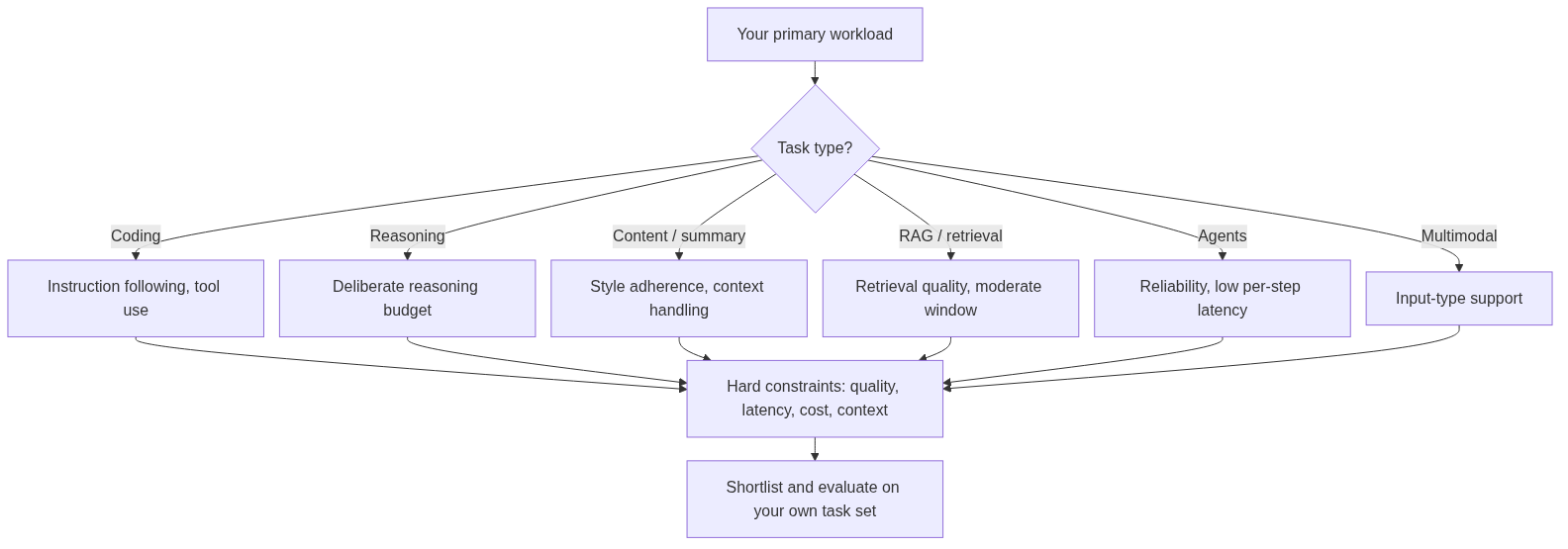
Different task types weight capability, context, latency, and cost in completely different ways. Before comparing models, decide which of these categories your primary workload falls into:
- Coding — code generation, review, debugging, and test writing; favors strong instruction-following and tool use.
- Reasoning — multi-step logic, math, planning; favors models with deliberate reasoning and larger compute budgets.
- Content generation — marketing copy, blog posts, social content; favors style adherence and consistency over raw logic.
- Summarization — condensing documents while preserving key facts; depends heavily on context handling.
- RAG / retrieval — answering questions over a knowledge base; depends on retrieval quality more than raw window size.
- Agents — tool calling, multi-step execution, and state management; favors reliability and low per-step latency.
- Multimodal — image, audio, or file understanding; narrows the candidate set to models with those input types.
Each of these changes which dimension is your hard constraint. A coding copilot and a batch summarization pipeline need very different models.
Real-time chat versus batch offline tasks
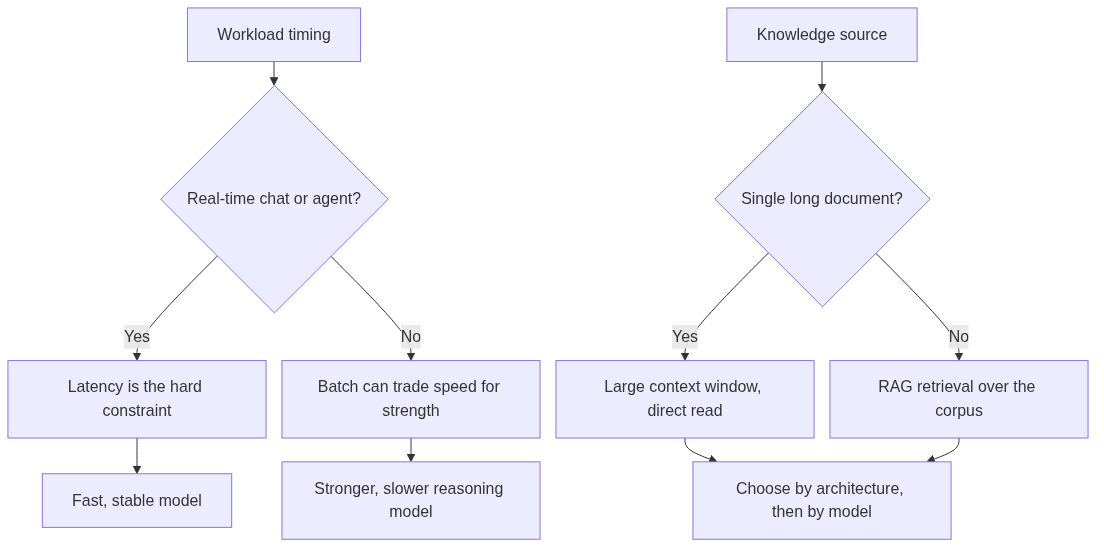
Latency is the primary constraint in an interactive assistant; output quality and throughput cost dominate in batch work. An interactive agent that makes the user wait several seconds per turn will lose users no matter how accurate the reasoning is. A batch job that runs overnight can afford a slower, stronger model because the cost of waiting is low and the value of correctness is high.
Long-context direct reading versus RAG/search
Context strategy is a use-case decision before it is a model-specification decision. When you have a single long document or a long codebase and need deep Q&A over it, a large context window that lets you hand the whole thing to the model is genuinely valuable. When your knowledge base is large, scattered, and continuously updated, retrieval (RAG) is usually more accurate and far cheaper than stuffing the entire corpus into a window. We cover this trade-off in more depth in what an LLM router is.
Separate Capability from Output Quality — Benchmarks Are Not Business Results
Different models excel at different things
Capability tells you what a model can do in general. Output quality tells you how well it does your specific task. A model may be excellent at reasoning yet mediocre at following your exact output format, tone, or schema. Treating a general benchmark score as a verdict on your workload is the single most common llm selection mistake.
The gap between benchmark score and real task performance is widening
That gap is not static. As one evaluation-focused analysis observes, “the gap between benchmark score and real task performance is larger now than it was in 2021” [3]. Benchmarks measure dimensions correlated with general capability, but they do not reliably predict how a model behaves on your particular prompt distribution, edge cases, and failure modes.
Evaluate on your own real task set
The correct evaluation is empirical: build a set of real tasks drawn from your workload, including edge and failure cases, and run candidates against it. Two proven techniques are LLM-as-judge — using a capable model to score outputs against defined criteria, which scales evaluation to thousands of examples at low cost [4] — combined with human spot-checking and A/B testing. Copying published scores is not a substitute for measuring your own task.
Engineering Constraints Are Hard Constraints — Context, Latency, Cost, Reliability
Context window: when a large window genuinely matters
Context sizes differ across model families by an order of magnitude, and this variation is a legitimate selection factor. Gemini 1.5 Pro launched with a 1M-token window, Anthropic’s Claude family sits around 200K, and GPT-4-generation models offer around 128K [2]. These are not interchangeable numbers: one determines whether you can hand a model a full codebase or a long contract in a single call.
But a large window is not automatically better. For very long corpora, one third-party test found that a RAG/retrieval approach achieved roughly 72–85% accuracy while raw 1M-token context stuffing landed near 58% — and the retrieval path was also faster and cheaper [5]. The rule: use a big window when a single document or codebase genuinely needs direct reading; use retrieval when your corpus is large and fragmented.
Latency: real-time and agents are sensitive; batch can trade speed for strength
Latency requirements split the field more sharply than any benchmark. Real-time chat and interactive agents are sensitive to first-token latency because users feel every wait. Batch and offline tasks can queue and retry, so they can afford slower, stronger reasoning. Before you shortlist models, write down your latency budget in seconds and your failure tolerance — this single step eliminates a large chunk of unsuitable candidates.
Cost: token price times call volume, over the long run
Unit price differences can span one to two orders of magnitude, and they only matter when multiplied by your call volume. The cost model is simple: input tokens × input price + output tokens × output price, scaled by how many requests you run per month over 12 months. Price sheets give you a per-million-token rate; they do not give you your bill. As an illustration of the spread, third-party roundups place Anthropic’s Opus at roughly $75 per million input tokens, Sonnet around $15, and Haiku in the $1–5 range [6], while open-source reasoning models such as DeepSeek’s V3 have been observed in the sub-dollar-per-million range under an MIT-style license [7]. Your actual numbers will differ, but the lesson holds: compute your own 12-month total before committing.
Reliability and availability: production is not a single output
A model that produces a great answer 98 percent of the time but returns 429 rate-limit errors during your peak hour is not production-ready. Selection must include uptime, rate limits, SLAs, degradation behavior, and a retry path. For customer-facing production APIs, availability is a hard requirement that can outweigh a small quality edge.
Integration, Operations, and Compliance Decide Your Switching Cost
API and integration: OpenAI-compatible endpoints lower switching cost — but compatibility is not capability
OpenAI-compatible APIs have become the de facto standard, and they meaningfully reduce integration cost: switching providers often means changing the base_url and api_key while keeping your request body intact [8]. Making base_url and model name configurable lets you flip between local and cloud, or between providers, without rewriting code [9].
The important caveat is that changing the base URL preserves your request shape but does not preserve model availability, quota windows, streaming behavior, timeout behavior, or error classification [8]. Compatibility lowers the cost of trying a model; it does not guarantee identical capability. You still have to validate each candidate against your task.
Multimodal and tool-calling requirements narrow the candidate set early
If your workload needs image, audio, file, or structured tool-calling inputs, that requirement alone eliminates models that lack those input types. Filter on these hard capability gates before you spend time evaluating quality or cost. This step is where many teams save the most effort — the candidate set shrinks dramatically and immediately.
Operational needs: switching, usage visibility, and key management
Long-term maintainability depends on operational details that are easy to overlook during a prototype. Can you switch a model in configuration without a code change? Can you see token usage per model, per project, and per time period? Can you manage separate API keys for development and production, or per client? When teams run several models across several projects, a unified way to manage keys, projects, and usage makes a multi-model setup sustainable instead of chaotic.
Privacy and compliance: judge by your own requirements — never invent assurances
Privacy and compliance are business-specific, not model-specific marketing points. Ask concrete questions: does your data leave your region? Does the provider train on your inputs, and can you opt out? What do your industry’s regulations require? Judge candidates against your own data-residency, training-opt-out, and regional-legal needs. Do not accept or repeat compliance claims that you cannot verify from the provider’s documentation.
A Model Selection Decision Table and Checklist You Can Reuse
The decision table
The table below maps each llm selection dimension to what to check, why it matters, and a representative scenario. Use it as a worksheet when comparing candidates.
| Selection Dimension | What to Check | Why It Matters | Example Scenario |
|---|---|---|---|
| Use Case / Task | Task type: coding, reasoning, content, summary, RAG, agents, multimodal | Determines the weight of every other dimension | Customer-support agent vs. batch document classification |
| Capability | What the model excels at; tool calling, structured output, multimodal support | Avoids treating a benchmark score as a business result | Coding assistant vs. general-purpose helper |
| Output Quality | Evaluate on your own real task set (LLM-as-judge + human A/B) | Leaderboard numbers are not your task’s results | Specific format, tone, or schema requirements |
| Context Window | How much context you truly need; single document vs. large corpus | Decides direct-read vs. retrieval architecture | Long codebase vs. large knowledge base |
| Latency | Real-time or batch sensitivity to response speed | Interactive UX and agent loop time | Live chat vs. overnight batch processing |
| Cost | Input/output token price × call volume × long-term usage | Unit-price gaps can scale 1–2 orders of magnitude | High-volume, low-margin product |
| Reliability / Availability | Uptime, rate limits, SLAs, degradation and retry paths | Production cannot judge a single output | Customer-facing production API |
| Multimodal | Whether image, audio, or file input is required | Narrows the candidate set before anything else | Document OCR, image understanding |
| API / Integration | OpenAI-compatible? SDK? Migration cost | Determines integration and switching cost | Existing OpenAI-based code stack |
| Operational | Model switching, usage visibility, API keys, project management | Determines long-term maintainability | Multi-team, multi-project setup |
| Privacy / Compliance | Data residency, training opt-out, regional regulations | Determines which models are usable at all | Regulated industry |
The practical model selection checklist
Make the framework concrete with a checklist you can apply to any project:
- Define one primary use case and write down its success metrics (quality, latency, and cost thresholds).
- List candidate models with their capability, context window, unit price, and latency profile.
- Build a 20–50 item evaluation set from your own real tasks, including edge and failure cases.
- Run three rounds per candidate: quality scoring (LLM-as-judge plus human spot-checks), latency measurement, and cost estimation.
- Decide whether your workload needs direct long-context reading or retrieval (RAG) before choosing a window size.
- Multiply input/output token prices by your estimated monthly call volume to compute a 12-month total cost.
- Confirm availability, rate limits, SLA, and a degradation/retry plan.
- Confirm hard capability gates: multimodal, file, and tool-calling support.
- Confirm API shape (OpenAI-compatible? SDK?) and its integration and migration cost with your existing stack.
- Confirm the operational side: project/key/usage management and easy future model switching.
- Judge privacy and compliance against your own business requirements — without inventing assurances.
- Document the decision and the reasoning so you can re-evaluate in 3–6 months.
Scenario comparison: how the same dimension flips your choice
Two quick scenarios show why a dimension that is decisive in one context is nearly irrelevant in another.
Real-time agent vs. batch offline work. For a live support agent, latency is the primary constraint and a fast, stable mid-size model is often the right pick even at a small quality cost. For a batch document-summarization job, latency barely matters and a stronger, slower reasoning model is worth the longer runtime because throughput quality and correctness dominate.
Long-context direct read vs. RAG. For deep Q&A over one long contract, a large context window that reads the whole document is the right architecture. For a large, scattered, continuously updated enterprise knowledge base, retrieval plus a smaller context is more accurate and cheaper than stuffing the corpus into the window [5].
Your Final Selection Flow — From Use Case to Go-Live
Walk the end-to-end order
Selection is a sequence, not a scatter of opinions. Follow this order so each step informs the next and eliminates candidates early:
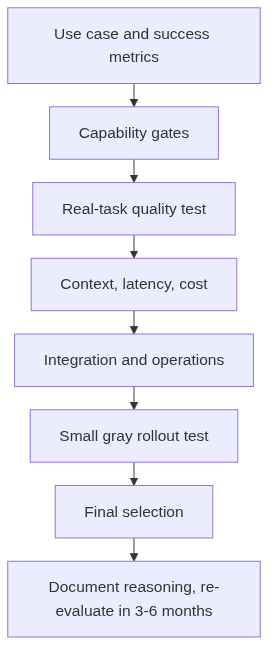
Use Case → Capability → Quality → Context → Latency → Cost → Integration → Operational Requirements → Test → Final Selection
Define the use case and success metrics first, then confirm each candidate has the required capability, then measure real-task quality, then weigh context, latency, and cost against your constraints, then confirm integration and operational fit, and only then test and select.
Make “Test” a fixed closing step
Treat testing as non-negotiable before go-live. Run a small-scale gray rollout that validates real-task quality, latency, and cost under production-like conditions before you scale to full traffic. A model that looks great on a 20-item local test can still surprise you under real concurrency, real prompt distributions, and real rate limits.
Document the decision and the reasoning
Write down why you chose each model, what you measured, and what your thresholds were. Models and prices change frequently — Anthropic, OpenAI, Google, and open-source projects ship new versions and adjust pricing on an ongoing basis. A written record lets you re-evaluate cleanly in 3–6 months instead of re-running the entire comparison from scratch.
Core Takeaways and Your Next Step
No single model is optimal for every task
The honest conclusion of any llm selection exercise is that no single model wins for every task. Different workloads reward different trade-offs between quality, latency, cost, context, and reliability. The goal is not to find a permanent winner but to build a repeatable process that produces a good decision for the current state of the models.
Rehearse the checklist on one real project
The fastest way to make this framework yours is to run it once on a real workload. Pick a project, fill in the decision table, build a small real-task evaluation set, and compare a few candidates side by side. When you need to test and switch multiple models, a unified access layer lowers the cost of that repeated integration — because you change a configuration value rather than rewriting client code for each provider [9]. That is the practical value of a multi-model access approach: it makes comparison and switching cheap enough to do properly.
Where to go next
If your workload skews toward code, read our guide to the best LLMs for coding. To compare two leading model families in depth, see the Claude vs Gemini comparison. To start evaluating models against your own workload, explore the model catalog and read the docs to see how a unified API can simplify multi-model testing and switching.
FAQ
What is LLM selection, and how is it different from model ranking?
LLM selection is a context-specific decision that balances quality, cost, latency, context, and reliability against your real production needs [1]. Model ranking is a public, generic comparison on leaderboards. A ranking tells you which model looks best on a benchmark; selection tells you which model fits your specific task and constraints.
Is there one LLM that is best for every task?
No. There is no universal winner [2]. Different workloads reward different trade-offs, so the right model depends on your use case, latency budget, cost ceiling, context requirements, and integration constraints. The goal is a repeatable selection process, not a permanent winner.
Should I pick a model based on benchmark scores?
Benchmarks are useful as a shortlist filter, not a verdict. The gap between benchmark score and real task performance is larger now than it was in 2021 [3]. Evaluate candidates on your own real task set using LLM-as-judge plus human spot-checks and A/B testing [4].
When does a large context window really matter?
A large context window matters when you need deep Q&A over a single long document or a long codebase that fits in one call. When your corpus is large and fragmented, retrieval (RAG) is usually more accurate and cheaper than stuffing the whole thing into a window [5].
How should I estimate LLM cost?
Compute input tokens × input price plus output tokens × output price, then scale by your monthly call volume over 12 months. Unit prices can differ by one to two orders of magnitude [6][7], so always compute your own total rather than trusting a per-million-token rate.
Does an OpenAI-compatible API mean models are interchangeable?
No. OpenAI-compatible endpoints lower integration and switching cost because you often only change the base URL and API key [8]. But compatibility does not mean identical capability, quota, streaming, timeout, or error behavior — you still need to validate each model against your task [8].
What operational factors should I check before going to production?
Confirm you can switch models in configuration without code changes, see token usage per model and per project, manage separate API keys for environments or clients, and track availability, rate limits, SLAs, and a retry path. These determine whether a multi-model setup stays maintainable over time.
How often should I re-evaluate my model choice?
Re-evaluate roughly every 3–6 months, or whenever a model you depend on updates or reprices. Document the reasoning behind your current choice so a re-evaluation is fast and clean instead of a full re-run from scratch.
References
Trismik — LLM Selection — — Provides the distinction between “model ranking” and context-specific “model selection” against real production needs.
Jean K. Lee — There Is No Single Best LLM (LinkedIn) — — Source for “there is no universal winner” and for the context-window figures for Gemini 1.5 Pro (1M), Claude (200K), and GPT-4 (128K).
Pristren — Vibes vs. Benchmarks: LLM Testing — — Source for the observation that the gap between benchmark score and real task performance is larger now than in 2021.
ML Journey — LLM Evaluation Beyond Benchmarks — — Source describing LLM-as-judge as a way to scale human-quality evaluation to thousands of examples at low cost.
Dataku AI — Gemini 1.5 Pro Million-Token Context Tested — — Source for the retrieval accuracy observation (RAG ~72–85% vs. raw 1M context ~58%) and that retrieval is cheaper and faster.
Claude Guide — Claude Haiku vs. Sonnet vs. Opus — — Third-party roundup of Anthropic model tiers and per-million-token price ranges, used as a cost-illustration example.
Hugging Face — DeepSeek-V3 — — Source for DeepSeek V3 being open-source under an MIT-style license and observed low per-million-token pricing.
Flo2 — OpenAI-Compatible API — — Source that switching providers often means changing base URL and API key, and that compatibility does not guarantee identical capability, quota, streaming, timeout, or error behavior.
ML Journey — Ollama OpenAI API Compatibility Drop-in Replacement Guide — — Source that making base_url and model configurable lets you switch between providers without rewriting code.