

AI Gateway vs LLM Router: What’s the Difference?
If you are evaluating model access infrastructure, you have probably seen the terms AI gateway and LLM router used almost interchangeably — and then discovered that different vendors use them to mean different things. The question that actually matters for your architecture is narrower: are these two layers competing, is one a subset of the other, or can they coexist in a single request path?
This article answers that specific question with a responsibility-based comparison rather than a product-by-product tour. It keeps each definition just deep enough to support a decision: what an ai gateway vs llm router comparison really turns on is not the tool you pick, but the layer whose job you are trying to fill.
Quick Answer: Are They Rivals, Layers, or Coexisting?
They are not competitors. An AI gateway and an LLM router are distinct layers that can — and often should — coexist in the same stack.
The cleanest way to separate them for an ai gateway vs llm router decision is by what each one decides. An AI gateway manages the *request envelope*: how a call reaches the model, who is allowed to make it, and what gets recorded about it. An LLM router makes the *model decision*: which model or provider should answer a given request in the first place [1].
To make that concrete: a gateway answers “how does this request get to the model we picked?” A router answers “which model should this request reach?” Those are two different questions, which is why the two layers frequently appear together rather than as alternatives [7].
What this article will clarify
The rest of this guide walks through four things you need to make a defensible choice:
- The responsibility split between request handling and model decision.
- The containment relationship — whether a gateway can include a router, and whether a router can stand alone.
- Three reference architectures that show where each layer sits in a request path.
- A decision rule you can apply to your own constraints instead of copying someone else’s stack.
You will not find a full re-explanation of “what is an AI gateway” or “what is an LLM router” here. Those definitions are covered only to the depth the comparison requires.
What an AI Gateway Actually Handles
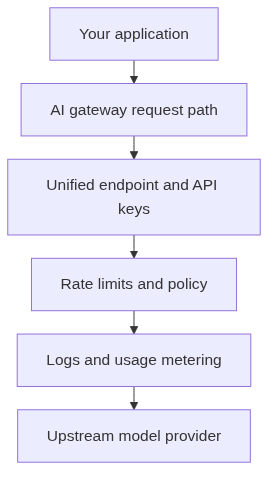
An AI gateway is the request-management boundary layer between your application and the model providers you call. Whatever product you use — Cloudflare AI Gateway, LiteLLM proxy, Portkey, Azure API Management — the gateway’s job is to normalize and govern the traffic that flows across that boundary.
The request-management boundary layer
A gateway gives your application a stable, unified endpoint. Instead of maintaining separate SDKs, authentication flows, and request formats for each provider, your app talks to one base URL and one API key. The gateway translates that normalized call into whatever each upstream provider expects [1].
This is why gateway products are described as proxies that sit in front of model calls: they forward, transform, and protect requests rather than make a smart choice about which model should serve them [6].
Control-plane responsibilities
Beyond forwarding traffic, a gateway carries the control-plane work that keeps model usage safe and auditable:
- Authentication and API keys — one credential for many providers, with per-key scoping by project or environment.
- Rate limiting and policy enforcement — quotas, spend limits, and access rules applied before a request leaves your boundary.
- Observability and logging — request logs, latency, error rates, and provider status in one place [5].
- Usage metering and billing — token counts and cost attribution tracked per model, project, or tenant so you can reconcile spend [5].
Some gateways add caching, retries, and circuit-breaking as part of this request-management role. Those are gateway concerns because they shape how requests are handled, not which model answers them [4][5].
When a gateway alone is enough
A gateway is sufficient when your model selection is simple or fixed. If you mostly call one or two models and your real pain is key management, cost visibility, or consistent logging across teams, a gateway gives you the control plane without adding a decision layer you do not need yet.
What an LLM Router Actually Decides
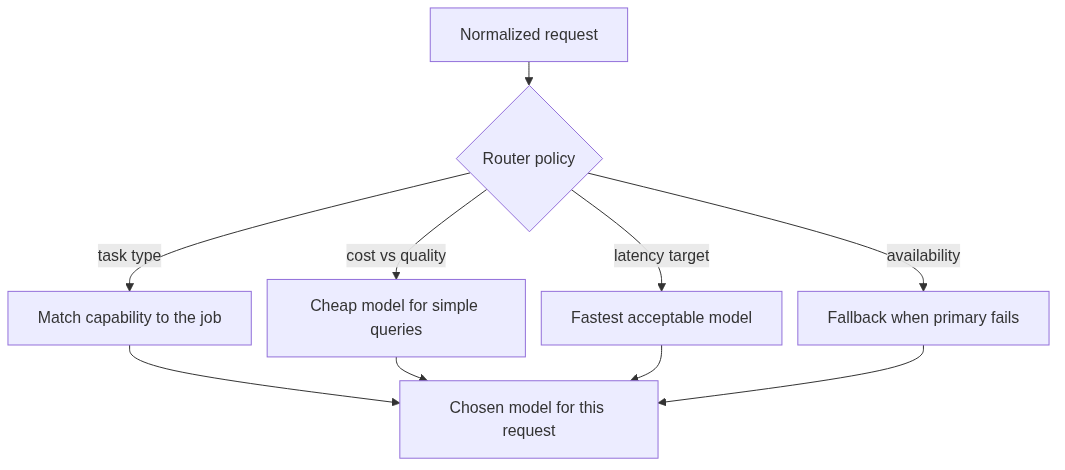
An LLM router is the model-selection decision layer. Its job begins where the gateway’s ends: once a request is authorized and normalized, the router decides which model or provider should serve it. The prompt is the primary input, and two requests that are byte-for-byte identical in their envelope can still be routed differently [1].
The model-selection decision layer
A router maintains a pool of candidate models and applies a policy to pick one per request. That policy can be deterministic — a fixed rule that maps task type to a model — or learned, where a classifier scores each request against the available models and chooses the best fit.
Because the decision happens per request, the router is where you encode the trade-offs that matter to your product: cost versus quality, latency targets, availability, and fallback behavior [2].
What drives the decision
Four inputs typically shape a routing decision:
- Task type — summarization, code generation, classification, and agent reasoning do not need the same model capability.
- Cost versus quality — simpler queries can go to cheaper models; complex ones justify a stronger model. RouteLLM’s research demonstrated over 2x cost savings on widely used benchmarks by routing simpler queries to cheaper models while keeping response quality close to the frontier model [2].
- Latency targets — real-time features may route to faster models even when a slower one would produce a better answer.
- Availability and fallback — when a primary model is down or rate-limited, the router can fail over to an alternative without surfacing an error to the user.
The economic case for a dedicated router is well documented. In controlled evaluations, the peer-reviewed RouteLLM work reached roughly 85% cost savings while preserving around 95% of GPT-4-level quality on the benchmarks it tested [3]. Those numbers are specific to that evaluation setup, not a universal guarantee — but they explain why routing has moved from niche optimization to a mainstream cost lever.
Scope boundary note
This article is not a deep dive into routing strategies. Whether you use threshold-based, classifier-based, or manually configured routing is a separate design decision. The point here is narrower: a router’s reason for existing is the model decision, and that is the responsibility that distinguishes it from a gateway.
AI Gateway vs LLM Router: Core Responsibilities at a Glance
The fastest way to internalize the difference is to put the two layers side by side and ask, for each responsibility, *which layer owns it*.
Overview comparison
| Responsibility | AI Gateway | LLM Router |
|---|---|---|
| Unified endpoint / base URL | Yes — the primary job | Not typically |
| Request normalization across providers | Yes | No |
| Authentication and API key management | Yes | No |
| Rate limiting and policy enforcement | Yes | Partially (per-route budgets) |
| Observability, logging, usage metering | Yes | Minimal |
| Cost / token attribution | Yes | No |
| Model selection per request | Not the core job | Yes — the primary job |
| Cost / quality routing logic | Optional feature | Yes |
| Fallback between providers | Optional | Yes |
| Latency-target routing | No | Yes |
The asymmetry is clear: nearly everything in the top half is gateway work, and nearly everything in the bottom half is router work.
Where the layers overlap and where they diverge
The overlap is smaller than the marketing suggests. Both layers may touch provider selection when a gateway ships a routing feature, and both may record some usage data. But the *primary concern* differs cleanly. A gateway optimizes the request path and its governance; a router optimizes which model answers [1].
The divergences are the useful part. If your team is arguing about authentication, spend limits, and key rotation, you have a gateway problem. If the argument is about paying for a frontier model on tasks a cheaper one handles fine, you have a router problem.
Why the confusion exists
The confusion is not accidental. Many products bundle both capabilities under one name and market them as a single “gateway” or “router” [6]. Cloudflare AI Gateway, for instance, now includes dynamic routing with conditions and fallbacks alongside its caching and rate-limiting controls [4]. Portkey similarly positions itself as a full gateway while shipping routing, fallbacks, and load balancing [5].
When a product does both jobs, it is natural to assume the terms mean the same thing. They do not. The product is simply implementing two distinct layers behind one interface — which is exactly the coexistence this article is describing.
Can a Gateway Contain a Router? Can a Router Stand Alone?
The relationship between the two layers is not fixed by the architecture; it is a product decision. Both containment and standalone deployment are legitimate patterns, and which one you see depends entirely on how a vendor chose to package the two responsibilities.
Gateway-can-include-router
A gateway product may embed routing logic as one of its features. This is the common case in commercial gateways: they add model routing alongside authentication, observability, and usage controls so that a team gets model decision and request management from a single integration point [4][5].
When a gateway contains a router, the routing decision typically happens *inside* the gateway’s request pipeline. The request is authenticated, normalized, and then passed to an internal routing policy that picks the model before the call goes upstream.
Router-can-stand-alone
A router does not require a full gateway control plane to be useful. Standalone routers sit directly in front of providers and handle model selection without necessarily offering your team authentication, key management, or deep usage metering [1].
This pattern fits when model decision is the dominant problem and you already have — or are willing to operate — the request-management layer yourself. Standalone routing is also common in research and self-hosted setups where teams want tight control over the routing policy without adopting a heavier gateway.
The practical takeaway
Containment is a packaging decision, not a conceptual conflict. A gateway “containing” a router is no more contradictory than an application framework containing a logging library. The router is a layer with a clear job; the gateway is a layer that may choose to include that job. When you evaluate a product, the useful question is not “is this a gateway or a router?” but “does this product give me the request-management and model-decision capabilities my architecture actually needs?”
Three Reference Architectures and When Each Fits
Once you accept that the two layers are separate, the architecture question becomes where to put them. Three reference patterns cover the realistic options.
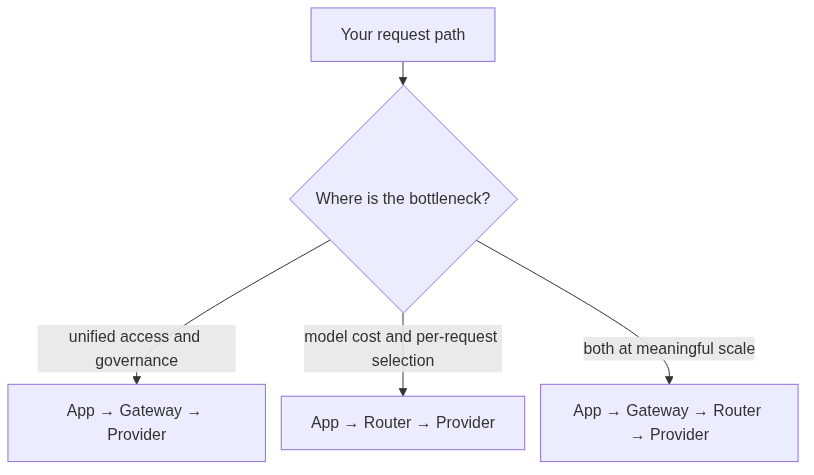
App → Gateway → Provider
The application calls a gateway, and the gateway forwards to a fixed provider. This is the right shape when you need unified access, policy, and usage control, but model selection is simple — a handful of models chosen manually or by configuration.
Best for: teams consolidating keys and cost tracking, enforcing rate limits, or normalizing access across a couple of providers without needing per-request model intelligence.
App → Router → Provider
The application calls a router, and the router chooses the model before the request reaches a provider. This shape fits when model selection is the primary problem and you can accept thinner control-plane coverage.
Best for: cost-sensitive workloads where routing simpler queries to cheaper models is the main goal, and where authentication, deep observability, or spend governance are handled elsewhere or are less critical.
App → Gateway → Router → Provider
The application calls a gateway, which handles request management, and the gateway delegates the model decision to a router behind it. This is the fullest pattern: governance at the front, decision logic delegated to a dedicated router.
Best for: production systems where you want both request management and intelligent model selection, and where keeping the two layers separable — so each can evolve independently — matters more than running a single combined product.
A note on product examples: when a platform such as gomodelhub describes routing capability, it is worth distinguishing what the *product actually supports* from what is *generic industry architecture*. The three patterns above describe industry-standard structures; any specific platform maps onto them according to its own feature set.
When You Need a Gateway, a Router, or Both
Rather than choosing a label, map your constraints to the layer that solves your bottleneck. The scenarios below give you a starting point, followed by a five-question checklist and a decision table.
Scenario comparison
A gateway is the right fit when your pain is operational: scattered API keys, no central usage view, inconsistent logging, or no way to enforce rate limits and budgets across teams. You are not losing much on model selection because your workload is stable.
A router is the right fit when your pain is economic: you are paying frontier-model prices for tasks a cheaper model handles well, or you want automatic fallback between providers to protect availability. You already have — or do not yet need — the full governance plane.
You likely need both when you are running production traffic at meaningful volume, with multiple teams, real cost exposure, and a task mix wide enough that no single model is optimal for everything. That combination is exactly where the request-management and model-decision problems show up together.
Five-question decision checklist
Work through these five questions before choosing an architecture:
- How many providers do you call today? One or two → a gateway may be enough. Five or more → routing value rises.
- How important are usage and policy controls? If key management, rate limits, and cost attribution are non-negotiable, you need gateway capabilities regardless of routing.
- Is cost optimization a real, measurable pain? If you can point to spend that routing could cut, that is a router signal.
- Do you need per-request model decisions, or is manual selection fine? Manual selection → gateway. Per-request intelligence → router.
- How mature is your team? A small team often benefits from a combined product; a large platform team may prefer separable layers it can operate independently.
Decision table
| Your situation | Recommended starting architecture | Why |
|---|---|---|
| Single provider, need key + usage control | App → Gateway → Provider | Governance is the whole problem |
| Multiple providers, fixed model per feature | App → Gateway → Provider | Unified access without routing complexity |
| High volume, wide task mix, cost exposure | App → Gateway → Router → Provider | Both problems are real at scale |
| Cost is the dominant pain, thin ops | App → Router → Provider | Routing first, add governance later |
| Prototype / evaluation phase | Combined product or thin gateway | Start simple, add the layer that matches the bottleneck |
The last row matters for this stage of your evaluation. If you are still deciding on architecture, you do not need to commit to a fully separated stack. Start with the simplest path that gives you visibility, then add the routing layer when the cost or task-mix signal justifies it.
Bottom Line and Next Steps
The core conclusion is worth restating: an ai gateway vs llm router comparison is not an either/or choice because the two layers solve different problems. A gateway manages how requests reach models; a router decides which model should answer them. They are complementary layers, and the strongest production stacks often run both.
The decision rule is simple: start with the layer that matches your current bottleneck. If key management, policy, and observability are the pain, add a gateway. If model cost and per-request selection are the pain, add a router. When both pains are real and you are at meaningful scale, run a gateway in front of a router and let each evolve independently.
Since you are still in the architecture-selection phase, the useful next step is not a purchase decision but an evaluation of how a unified multi-model platform maps onto the patterns above. Explore the models and documentation at gomodelhub to see how one OpenAI-compatible API handles unified access, key management, and usage tracking — and how that maps to the gateway and router layers discussed here. Read the docs to test the integration path before you commit to a stack.
FAQ
Can you use an AI gateway and an LLM router at the same time?
Yes. Because a gateway manages the request envelope and a router makes the model decision, they solve different problems. Running a gateway in front of a router — App → Gateway → Router → Provider — is a standard pattern when you need both request governance and per-request model selection.
Is an LLM router a type of AI gateway?
Not in the strict sense. A gateway is defined by request management: unified endpoints, authentication, policy, observability, and usage. A router is defined by model decision. Some gateway products embed routing as a feature, but that is a packaging choice, not proof the terms are synonyms [1][6].
When do I need a gateway but not a router?
When your model selection is simple or fixed and your real pain is operational — scattered API keys, no cost visibility, no rate limits, inconsistent logs. A single gateway gives you that control plane without adding a decision layer you do not need.
When do I need a router but not a gateway?
When cost optimization and per-request model selection dominate, and you either already handle request management or can accept thinner governance. Standalone routers sit in front of providers and route each request to the best model without offering the full gateway control plane [1].
Does routing actually save meaningful money?
In controlled evaluations, RouteLLM demonstrated over 2x cost savings on widely used benchmarks by sending simpler queries to cheaper models [2]. The peer-reviewed work reached roughly 85% cost savings while preserving about 95% of GPT-4-level quality in its specific test setup [3]. Real savings depend on your task mix, so treat those as evaluation results, not a guarantee.
What is the difference between a gateway and a proxy?
A proxy primarily forwards model requests and responses. An AI gateway usually adds model-aware controls such as routing policy, fallback, usage records, and cost attribution on top of forwarding [6]. A proxy is the narrowest of the three; a gateway is a proxy plus governance.
Which products bundle both gateway and router capabilities?
Many commercial gateways do. Cloudflare AI Gateway adds dynamic routing with conditions and fallbacks alongside caching, rate limits, and retries [4]. Portkey ships routing, fallbacks, and load balancing as part of a full gateway [5]. These products implement two distinct layers behind one interface, which is why the terms get conflated.
Should I start with a combined product or separate layers?
If you are still evaluating architecture, start simple. A combined product or a thin gateway gives you visibility with minimal operational overhead. Add a dedicated routing layer only when your cost or task-mix signal justifies the added complexity.
References
Inferbase — LLM Gateway vs LLM Router: What Each Layer Actually Does — provides the gateway-vs-router responsibility split: a gateway decides how a request reaches a chosen model; a router decides which model a request should reach.
RouteLLM: Learning to Route LLMs with Preference Data (arXiv:2406.18665) — provides the research basis for routing’s cost/quality trade-off, demonstrating over 2x cost savings on widely used benchmarks.
Digital Applied — LLM Model Routing in 2026 — reports the RouteLLM evaluation figures of roughly 85% cost savings while preserving ~95% of GPT-4 quality.
Braintrust — Portkey alternatives: 6 AI gateways compared — describes Cloudflare AI Gateway’s dynamic routing, caching, rate limits, and retries across 20+ providers at the edge.
TokRepo — Portkey AI Gateway — describes Portkey’s gateway feature set: routing, fallbacks, load balancing, caching, observability, and access control.
ModelFlare — LLM Proxy vs AI Gateway — explains that a proxy primarily forwards requests while a gateway adds model-aware controls such as routing policy, fallback, usage records, and cost attribution.
TrueFoundry — What is an LLM Router? — provides background on how LLM routers and AI gateways are discussed together as layers between applications and language models.