

What Is an LLM Gateway? A Developer’s Guide to Unified Model Access
If your application talks to more than one model provider, you already know the pattern: one OpenAI SDK, one Anthropic SDK, one Google client, each with its own key, its own auth header, and its own billing portal. What started as a quick comparison turns into a permanent tax on every release. An LLM gateway is the layer that removes most of that tax by sitting between your application and the model providers, exposing one interface and one key while letting you point at whichever model fits the task.
This guide explains what an LLM gateway actually does, where it sits in the request chain, why calling providers directly gets painful, and how to tell whether your team should adopt one. It stays on the concept of a unified access layer — routing strategy and a full gateway-versus-router comparison are covered in a separate guide.
Why “Calling Every Model Provider Directly” Gets Painful Fast
The multi-provider reality — one app, N SDKs, N keys, N auth flows, N billing portals
The moment a product integrates a second model provider, a second set of conventions enters the codebase. Each provider ships its own SDK or client, its own authentication scheme, its own request shape, and its own usage dashboard. In practice this means N dependencies to keep updated, N keys to rotate and store, N auth headers to manage, and N portals to log into when you want to know how much a feature costs.
That overhead is not hypothetical. Community and vendor write-ups consistently describe the same friction: juggling API keys and provider dashboards, and rebuilding an integration for every provider when the application already knows how to call an OpenAI-compatible client [3].
The analogy that frames the whole piece — per-vendor hookups vs. one unified “meter/breaker” between your app and the model providers
A useful way to think about it is electrical service. Wiring every appliance directly to a different utility and metering each one separately would be unmanageable. Instead, one breaker panel and one meter sit between your building and the grid: you draw whatever you need, and the panel routes it where it has to go. An LLM gateway plays the same role in the model world. It is the single meter and breaker between your application and the model providers — one point of entry, one place to see what you consumed, and one place to switch which “circuit” (model) is live.
The question this guide answers — what an LLM gateway really does, why you need it, and when your team should adopt one
The rest of this guide answers three questions in turn: what an LLM gateway is and where it sits in the request chain, what concrete work it takes off your plate, and which signals mean your team is ready for one. If you recognize two or more of the pain points above, the answer to “do we need a gateway?” is likely “evaluate one” — not “rewrite everything today.”
What an LLM Gateway Is and Where It Sits in the Request Chain
A working definition — an intermediate layer between your application and multiple model providers
An LLM gateway is an intermediate layer that sits between your application and one or more model providers. Your application sends a request to the gateway’s endpoint; the gateway authenticates it, selects or forwards to the target model, and returns the response. From the application’s point of view, there is one provider to talk to — the gateway — regardless of how many model providers sit behind it.
This is why the “gateway” framing is accurate: it is a control point that mediates access, not a model itself. It is the base layer in the model-access stack, the thing your code calls directly, rather than another model or provider [5].
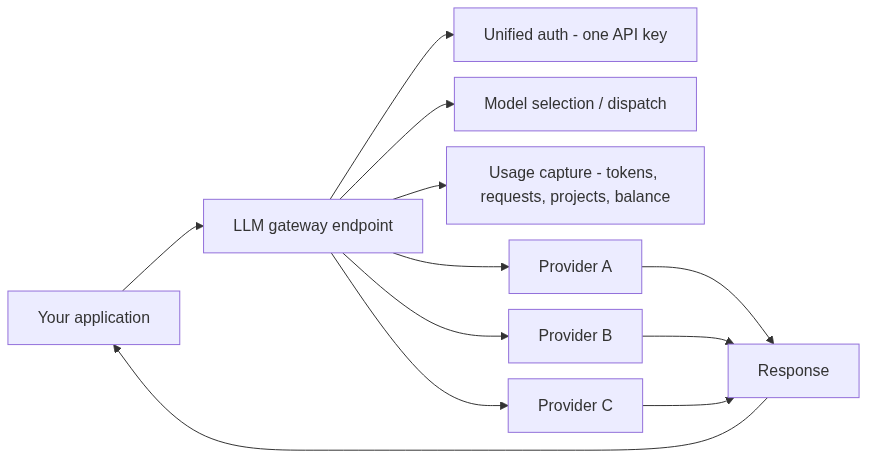
The request flow — App → Gateway → unified auth / model selection → Provider A/B/C → Response
A request through an LLM gateway looks like this:
Application  →  LLM Gateway  →  Provider A / Provider B / Provider C  →  Response
                     │
                     ├─ unified authentication (one API key)
                     ├─ model selection / dispatch
                     └─ usage capture (tokens, requests, project, balance)
The application never talks to Provider A, B, or C directly. It talks to the gateway, and the gateway holds the integration details for each upstream provider. This is the same pattern used by widely deployed gateways such as OpenRouter and LiteLLM, which accept requests at one endpoint and route them to whichever model you specify [2].
What the gateway does with each request — still a standard request in, but the gateway owns dispatch to the right model and returns the response
The key point for developers is that the request that enters the gateway looks ordinary. It is still a standard chat-completion request with a model name, messages, and parameters. What changes is ownership: the gateway handles authentication against each upstream provider, decides which model actually serves the request, and returns the response through the same interface your client already understands. Your business code does not need to know the details of any single provider’s API.
The Real Cost of Calling Providers Separately
Five sources of complexity without a gateway — multiple SDKs, scattered keys and auth, inconsistent billing and usage views, model switching that means rewriting business code, and vendor lock-in
Removing the gateway does not remove the work — it just spreads it across your codebase. Five costs recur in direct multi-provider setups:
- Multiple SDKs and dependencies. Each provider pulls in its own client, its own versioning, and its own maintenance burden.
- Scattered keys and auth. Keys live in different places, use different formats, and have different rotation rules.
- Inconsistent billing and usage views. Cost lives in N separate dashboards, each with its own definition of a token or a request.
- Model switching means rewriting business code. To compare or swap models you change integration logic, not just a config value.
- Vendor lock-in. The deeper the code couples to one provider’s API, the harder it is to leave or diversify.
The low-migration argument — why “swap base URL + key + model id” is the value that matters
The reason gateways took off is that most of this pain disappears when the interface is OpenAI-compatible. For a standard OpenAI-compatible chat-completions client, migrating to a gateway usually means changing the base URL, the API key, and the model id — nothing else [4]. The request shape stays the same, the streaming behavior stays the same, and the code stays the same.
That low migration cost is the whole point of a unified access layer. Your application already knows how to call an OpenAI-compatible client, so adding model choice should not require rebuilding that integration for every provider [3].
Scenario comparison — direct multi-provider calls vs. unified gateway access
| Dimension | Direct multi-provider calls | Through an LLM gateway |
|---|---|---|
| SDK / dependencies | One SDK per provider, many dependencies | One OpenAI-compatible client |
| Authentication / keys | Separate account and API key per provider | One API key, unified authentication |
| Request format | Each vendor’s shape and parameters differ | One request shape; the gateway absorbs differences |
| Model switching | Requires changing business code and integration logic | Change the model name or config, no business-code rewrite |
| Usage / cost visibility | Scattered across provider dashboards | Tokens, requests, projects, and balance in one view |
| Vendor lock-in | High — code deeply coupled to one provider | Low — model choice stays flexible |
What a Gateway Actually Handles for You
Authentication and API abstraction — one API key plus an OpenAI-compatible interface as the common “dialect”
The first thing a gateway standardizes is access. Instead of maintaining one account and key per provider, you hold a single API key that the gateway accepts. Behind the scenes it manages the credentials needed to reach each upstream provider.
The interface that makes this practical is the OpenAI-compatible format. “OpenAI-compatible” generally means the Chat Completions contract: Bearer-token authentication through the Authorization header, a JSON request body with model and messages, and a streaming shape that existing clients already expect [1][7]. Because this format became a de facto standard, one OpenAI-compatible client can talk to the gateway, and the gateway can talk to many providers [7]. A single API key in an OpenAI-compatible format is precisely what lets existing code keep working with minimal changes [2].
Usage visibility — token, request, project, and balance visibility in one place instead of scattered provider dashboards
The second job is observability. A gateway can capture usage at the point where every request already passes through, so input tokens, output tokens, request counts, project-level spend, and account balance appear in one place. That is a meaningful difference from running to several provider portals and reconciling numbers that do not line up.
Provider and model switching — change the model name or config to switch, without touching business code
The third job is switching. Because the gateway owns dispatch, switching models is a configuration change rather than a code change: you update the model name or the relevant config, and the gateway sends subsequent traffic to the new target. Teams use this to tier by task — high-value models for complex work, cost-effective models for routine or high-volume calls — without maintaining parallel code paths.
Unified governance — organizing keys and usage by project, environment, and team
The fourth job is governance. With all traffic flowing through one layer, you can organize keys and usage by project, environment, or team. A developer key for staging looks different from a production key; a client’s project spend is visible separately from an internal one. This gives technical teams a single control plane instead of a set of loosely coupled provider accounts.
LLM Gateway vs. AI Gateway vs. LLM Router
Boundary table — one-line positioning of each concept
| Concept | One-line positioning | How this guide treats it |
|---|---|---|
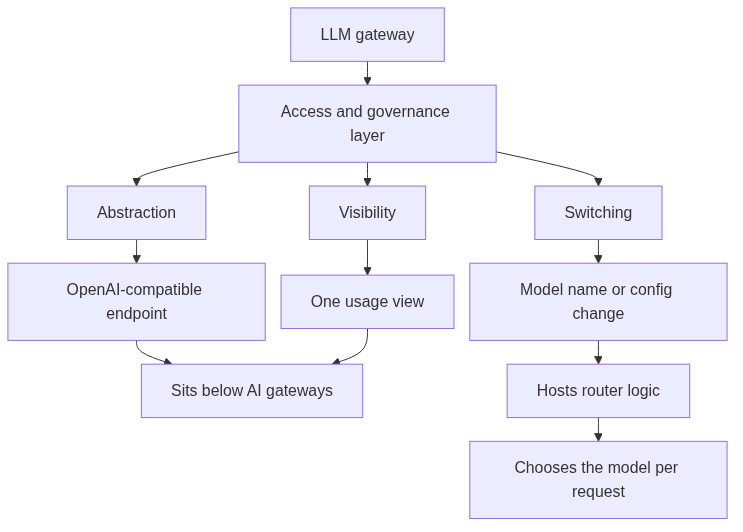
| LLM Gateway | Unified access and governance layer between your app and model providers | The subject of this guide |
| AI Gateway | A broader orchestration layer that also governs agents, tools, and guardrails on top of model access | Boundary note only — not expanded here |
| LLM Router | The decision logic that selects which model serves a request | Boundary note only — routing strategy is a separate guide |
The distinction matters because the terms overlap in practice. An LLM gateway is the base layer that mediates provider calls; an AI gateway sits on top of that base layer and additionally governs agent traffic, tools, and guardrails [5]. A router is narrower still — it refers specifically to the decision logic that picks which model handles a given request [6]. This guide focuses on the LLM gateway as the unified access layer; routing strategy and a full gateway-versus-router comparison live in a separate guide.
Why the OpenAI-compatible interface matters — a shared “dialect” that lets existing OpenAI clients adopt with minimal change
The OpenAI-compatible interface is the shared dialect that makes all of this practical. Because so many SDKs and tools already speak the Chat Completions format, a gateway that exposes an OpenAI-compatible endpoint lets existing OpenAI clients adopt it with minimal change [1]. You keep one client shape and make the model the primary variable [3].
Scope note — this piece stays on the LLM gateway concept; routing strategy and full gateway-vs-router comparison live in a separate guide
To keep this explainer focused, it does not go deep into routing policies, load balancing, fallback logic, or the full comparison between gateways and routers. Those are separate, strategy-heavy topics. Here, the goal is the concept: what the unified access layer is, what it handles, and when you need it.
How to Tell Whether Your Team Needs an LLM Gateway
A signal checklist — tick the signs
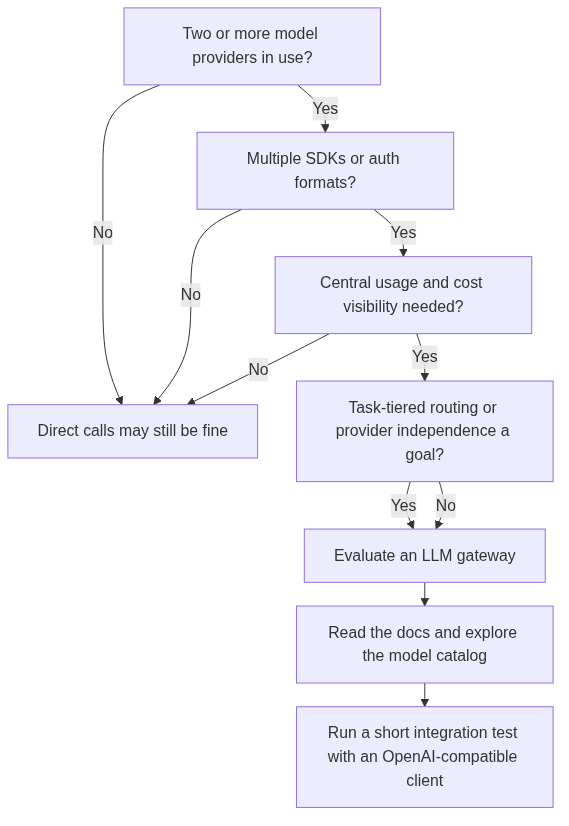
If you check two or more of these, a unified access layer is worth evaluating:
- The product already uses, or plans to use, two or more model providers
- The codebase maintains multiple SDKs, multiple auth formats, or multiple request shapes
- The team frequently compares model output, speed, or cost
- You want task-tiered cost calls (high-value models for complex work, cost-effective models for routine or high-volume work)
- Reducing dependence on a single provider is a stated goal
- You need to manage keys and usage centrally by project, environment, or team
- You want “change the model name or config” to switch, rather than editing business code
An evaluation framework for technical decision-makers
When you compare options, these are the questions that matter most:
| Evaluation question | What to check |
|---|---|
| Does it expose an OpenAI-compatible interface? | Whether existing OpenAI clients can adopt with minimal change [1] |
| How does model switching work? | Change a model name/config versus rewriting business code |
| Is usage and cost centrally visible? | Tokens, requests, projects, and balance in one place |
| Is key management isolated by project/environment? | Clean boundaries between dev, staging, production, and clients |
| Does it support task-tiered cost routing? | The ability to use cost-effective models for routine work and high-capability models for complex tasks |
First steps — a five-step onboarding flow, and where to go next
Adopting a unified access layer does not require a rewrite. The typical path is short and reversible:
- Create an API key.
- Set the API Base URL to the gateway endpoint.
- Pick a model from the catalog.
- Send a request through your existing OpenAI-compatible client.
- View usage and consumption in one place.
Because the interface is OpenAI-compatible, step 4 usually works with the client you already have. The natural next moves are to read the docs to confirm the request shape, and to explore the model catalog to see which models fit which tasks — before deciding on any rewrite.
Core Takeaway and What to Do Next
Recap — an LLM gateway is the unified access layer between your app and model providers
An LLM gateway is the unified access layer between your application and the model providers behind it. It replaces N SDKs, N keys, N auth flows, and N billing portals with one OpenAI-compatible endpoint, one API key, centralized usage visibility, and config-driven model switching. The value is not a new model or a faster model — it is removing the overhead that appears the moment your app talks to more than one provider.
Decision prompt — if you checked 2+ signals, read the docs and explore the catalog first
If your team checked two or more signals in the list above, the next move is low-cost: read the documentation to confirm the interface and request shape, and explore the available models to see how they map to your tasks. There is no need to rewrite anything to evaluate whether a unified access layer fits.
CTA — explore available models and read the docs
To see a unified OpenAI-compatible interface in practice, start with the GoModelHub docs to review the request shape and onboarding flow, then explore the model catalog to compare models across your use cases. A short, reversible integration test will tell you more about fit than any comparison chart.
An LLM gateway is an intermediate layer between your application and one or more model providers. Your app sends requests to the gateway’s endpoint, and the gateway authenticates, dispatches to the right model, and returns the response — so your app talks to one interface instead of many provider APIs.
When you call providers directly, you maintain one SDK, key, auth flow, and billing portal per provider. Through an LLM gateway you hold one OpenAI-compatible endpoint and one API key, and the gateway absorbs the differences between providers. Model switching becomes a config change rather than a business-code rewrite.
It generally means the gateway exposes the Chat Completions contract — Bearer-token authentication, a JSON request with model and messages, and a streaming shape that existing OpenAI clients already expect [1][7]. That lets existing clients adopt the gateway with minimal change.
An LLM gateway is the base layer that mediates model and provider calls. An AI gateway is a broader orchestration layer that sits on top and additionally governs agents, tools, guardrails, and eval gates [5]. This guide focuses on the LLM gateway concept.
A router refers specifically to the decision logic that selects which model serves a request [6]. An LLM gateway is the broader access and governance layer, which may include routing plus authentication, usage visibility, and model switching. Routing strategy is covered in a separate guide.
Consider it when you use two or more model providers, maintain multiple SDKs or auth formats, need centralized usage and cost visibility, want config-driven model switching, or want to reduce dependence on any single provider. If you check two or more signals, evaluate a gateway before rewriting anything.
Usually not. For a standard OpenAI-compatible client, migration typically means changing the base URL, the API key, and the model id [4]. Your request shape, streaming, and business logic stay the same.
No. A gateway is a control point that mediates access — it is not a model. Model output depends on the upstream model you select. A gateway can change which model you call and how you observe usage, but it does not guarantee or alter any single model’s results.
FAQ
What is an LLM gateway in simple terms?
How is an LLM gateway different from calling a provider API directly?
What does “OpenAI-compatible” mean for an LLM gateway?
What is the difference between an LLM gateway and an AI gateway?
What is the difference between an LLM gateway and an LLM router?
When should my team adopt an LLM gateway?
Does adopting an LLM gateway require rewriting my code?
Does an LLM gateway add a model or change model output?
References
Modelflare — OpenAI-Compatible API Guide — defines what OpenAI compatibility covers (Bearer-token auth, JSON request shape, streaming pattern)
stevecv — Using OpenRouter as an LLM Gateway for Multi-Model Pipelines — single API key in OpenAI-compatible format so existing code works with minimal changes
flatkey.ai — One OpenAI-Compatible Base URL for Multi-Model Prompt Testing — keep one client shape and make the model the primary variable
AnyModel — OpenRouter alternative: cheaper multi-model API — migration for OpenAI-compatible clients means changing base URL, API key, and model id
FutureAGI — AI Gateway vs LLM Gateway — AI gateway governs agents/tools on top of the LLM gateway base layer
ArchitectureDiagram.ai — LLM Routing Architecture — routing refers to the decision logic that selects which model handles a request
Ertas AI — What “OpenAI-Compatible” Actually Means — OpenAI-compatible means the Chat Completions API format (POST /v1/chat/completions)